Role Operating Systems: The Missing Layer Between Personal Productivity and Team Execution
Intelligence is getting cheaper. Coordination is not. Role Operating Systems close the gap between individual productivity and team execution.
Intelligence Got Cheaper. Coordination Didn't.
Stuart Winter-Tear nails it: "...intelligent got cheaper. Coordination did not. People do not want agents. They want outcomes with less friction."
Everyone's building personal operating systems. Daniel Miessler has Telos. Nate Jones has his Chief of Staff/OpenBrain system. Productivity Twitter pushes second brains, zettelkasten, and AI-augmented workflows. The tools keep improving. Claude, GPT, local LLMs, agent frameworks.
Individual capability is through the roof. Coordination overhead hasn't budged.
You optimized for your productivity. But you work on a team. The more productive you got individually, the more the team friction showed. Your brilliant notes stayed in your system. Your insights never reached the people who needed them. You got faster at working alone while the handoff gaps widened.
Here's the math that nobody talks about: every person on the team got 3x faster, and the team got maybe 1.2x faster. The delta is coordination waste.
Role Operating Systems exist to close that gap.
The Composition Problem
I watched a feature die at NeuroBlu because of a handoff. Our PM spent three weeks with pharma clients, understood exactly what they needed for their schizophrenia trial data, wrote a detailed brief. The architect got a 30-minute walkthrough and built what he thought he heard. Six weeks and roughly $40K in engineering time later: technically solid feature, completely wrong problem. The PM's context about why the client needed cohort-level breakdowns (not patient-level) never made it across the gap. I was the PM. The brief was mine.
My NeuroBlu break wasn't unusual. It's the rule. Every handoff is a compression step:
- PM to Architect: rich customer context becomes a 2-page brief and 30 minutes. 80% of why-this-matters, gone.
- Architect to Engineer: technology trade-offs become diagrams and ticket descriptions. The alternatives considered, gone.
- Engineer to QA: edge cases and assumptions become a test environment and stale docs. The mental model that explains why it works, gone. This isn't just a feeling. Jeremy McEntire ran controlled experiments with multi-agent AI systems, no humans involved, and watched performance collapse with each boundary added.
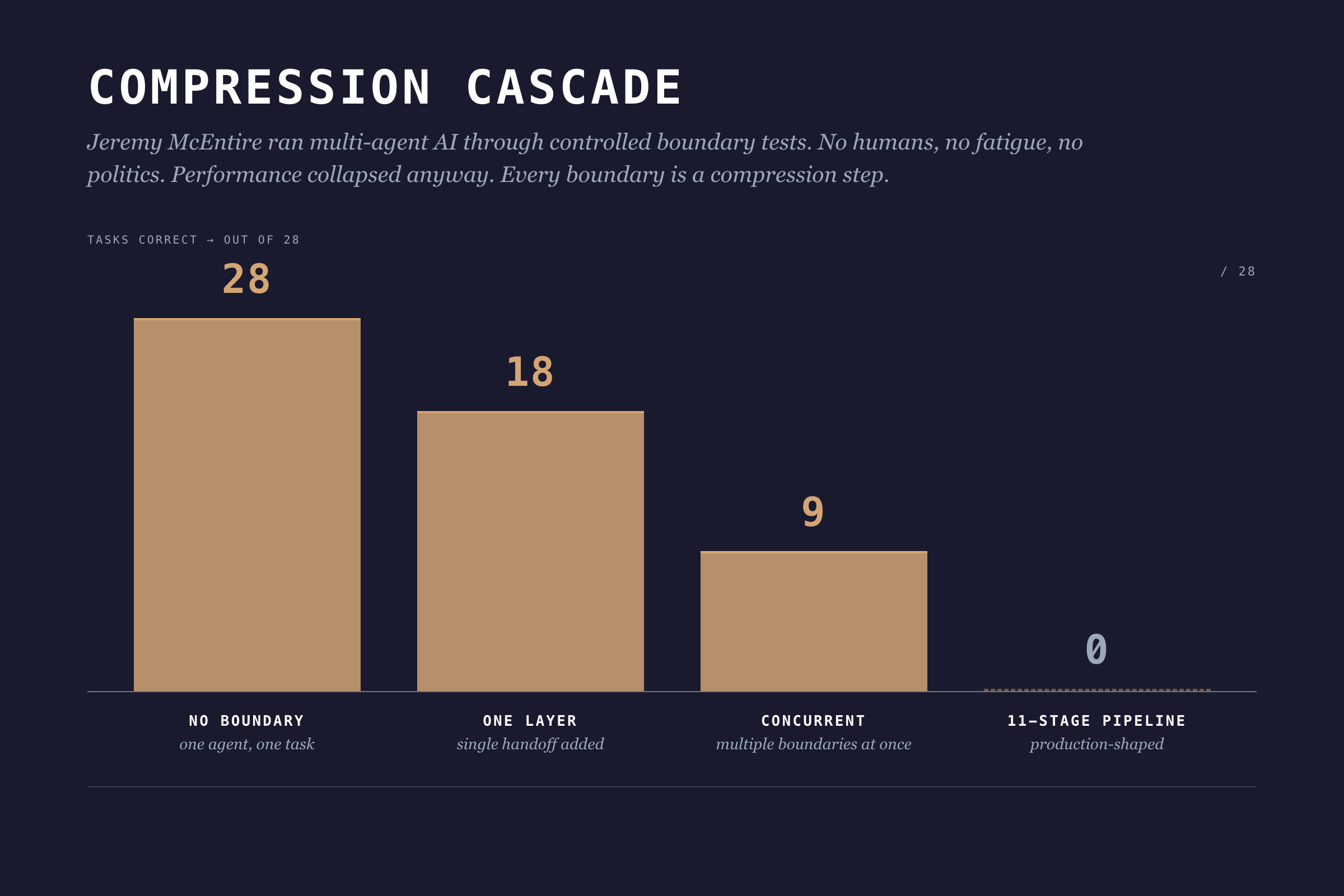
One agent, no boundaries: 28 out of 28 tasks correct. Add one boundary layer: 18. Add concurrent boundaries: 9. An 11-stage pipeline: 0 out of 28. Zero. No ego, no fatigue, no office politics. Pure architecture.
Information theory has a name for this: the Data Processing Inequality. In any chain X → Y → Z, Z can never have more information about X than Y does. Every boundary is a compression step. Information gets destroyed. Adding more process layers can't fix it.
I wish I'd known this three years ago. I kept scheduling more review meetings, thinking more touchpoints would fix the context loss. They didn't. I was adding overhead to the compression.
The underlying problem: individual workflows produce outputs optimized for the individual, not for the team.
Role Operating Systems: A Different Approach
What if individual workflows were designed to compose?
A Role Operating System flips the productivity question. Instead of "how do I work more effectively?" it asks "how does my work feed the team?"
Each role gets their own OS: agents, context scaffolds, workflows. But here's the twist: each OS is designed with explicit interfaces. What context does this role consume? What does it produce? At which lifecycle stages?
I call this composable individuality. (I made that up. I'm not 100% sure it's the right term but nobody's proposed a better one yet.)
You still work how you work. Your agents assist with your tasks. Your workflows match your thinking style. But the outputs conform to shared contracts that other roles can consume.
Winter-Tear offers a clean test for whether you're actually building something composable: "If you can name the workflow owner, the source of truth, the service level, and the audit trail, you are building an agent specialist. If you cannot, you are probably building a copilot."
Role OSes are how you answer those four questions for every role on your team.
The Lifecycle: Six Stages
Skipping Decide costs more than skipping Discover. By the time you've built the wrong thing, you've burned the team's trust along with the budget. The lifecycle isn't bureaucracy. It's where compounding mistakes get caught.
DPOS uses a six-stage lifecycle:
1. Discover
What happens: Problem identification, market research, user feedback synthesis, opportunity assessment.
Key question: What problem are we solving, and is it worth solving?
Output: Problem brief with validated customer need, market context, and preliminary feasibility signals.
2. Decide
What happens: Architecture selection, scope definition, risk assessment, resource allocation.
Key question: Should we build this, and how?
Output: Shaped pitch with defined approach, appetite (time budget), and go/no-go decision.
3. Build
What happens: Implementation, data pipelines, feature development, integration work.
Key question: Can we deliver this within our appetite?
Output: Working components with documentation and test coverage.
4. Test
What happens: Validation, quality checks, ethical review, user acceptance.
Key question: Does this work correctly and responsibly?
Output: Validated release candidate with quality metrics and risk assessment.
5. Ship
What happens: Deployment, monitoring setup, launch coordination, customer communication.
Key question: Is this ready for production?
Output: Live product with observability and rollback capability.
6. Evaluate
What happens: Usage analysis, feedback synthesis, impact assessment, iteration planning.
Key question: Did we solve the problem, and what's next?
Output: Learnings document with validated outcomes and next cycle priorities.
The Role x Lifecycle Matrix
Different roles engage at different stages. Here's how they compose:
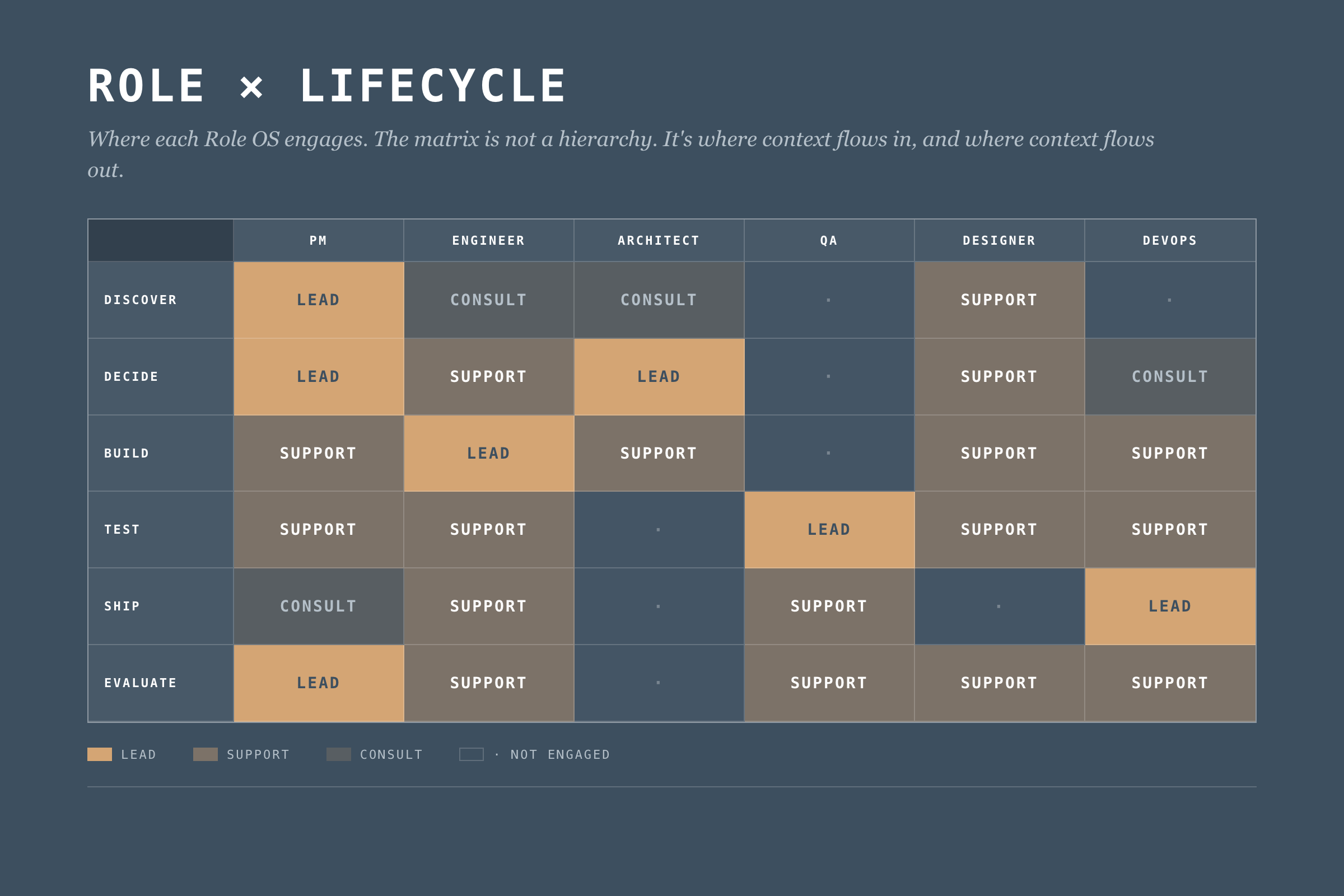
This matrix defines where each Role OS engages. But engagement isn't enough. We need explicit context flows.
What Makes a Role OS
A Role Operating System has four components. Most teams start with agents. Wrong order. Start with handoffs, end with agents. I'm presenting them in the order most readers want to read them, not the order you should build them. The "Building Your Role OS" section at the end has the right sequence.
1. Agents
AI assistants tuned to the role's work. Not generic chatbots. Specific agents for specific tasks.
Example (Data PM):
- Stakeholder Synthesizer: Processes meeting notes, extracts themes, identifies conflicting requirements
- Market Scanner: Monitors competitor activity, synthesizes industry trends
- Feedback Analyzer: Aggregates customer feedback, identifies patterns across channels
- Pitch Shaper: Helps structure problem/appetite/solution for betting table
Each agent has defined inputs, outputs, and oversight requirements. The PM reviews stakeholder synthesis before it feeds decision-making. The feedback analyzer flags low-confidence patterns for human verification.
But oversight isn't optional decoration. Nate Jones documented a case where an experienced engineer's coding agent deleted 2.5 years of production data. Not a junior mistake. An architectural one: too much write access, no rollback verification, no blast radius limits.
Five constraints every Role OS agent needs:
- Defined blast radius before running any write operation
- Read-broad, write-narrow access by default
- Irreversibility assumed unless explicitly proven otherwise
- Staged environments for mutations (staging first, production second)
- Explicit confirmation for destructive actions (never implicit)
An agent that can do damage at the speed of AI needs guardrails that work at the speed of AI. Reviewing the output after doesn't help when the data is already gone.
2. Context Scaffolds
The boring component that decides whether the OS works. What the role knows (consumes) and what the role provides (produces).
Context In (Data PM):
- Business strategy and portfolio priorities (from leadership)
- Technical constraints and platform capabilities (from Architect)
- Quality metrics and trust status (from QA/Data Lead)
- Customer feedback and usage patterns (from Product Analytics)
Context Out (Data PM):
- Problem briefs (to all roles)
- Shaped pitches (to Architect, Engineering)
- Prioritization decisions (to all roles)
- Customer context summaries (to Designer, Engineer)
Context scaffolds make dependencies explicit. If the PM needs technical constraints from the Architect, that's a defined interface. Not a Slack message at 4pm on Friday.
3. Workflows
Workflows fail where they're least visible, in the parts you assumed everyone knew. How the role moves through lifecycle stages.
Example (Data PM Discover Workflow):
1. Trigger: New cycle begins OR significant feedback pattern detected
2. Gather: Pull latest customer feedback, market data, stakeholder inputs
3. Synthesize: Run Stakeholder Synthesizer and Feedback Analyzer agents
4. Validate: Review agent outputs, flag uncertainties, verify with sources
5. Frame: Draft problem brief with customer need + market context
6. Share: Publish problem brief to Context Out interfaces
7. Handoff: Schedule Decide stage kickoff with Architect
Workflows define the rhythm. They adapt to circumstances. But they keep key steps from getting skipped and make handoffs explicit instead of assumed.
4. Handoff Contracts
This is where most teams fall apart, and where the biggest gains live.
Jones puts it bluntly: "Most teams are treating agents like interns: throw tasks over the wall, hope the summary is honest." He's talking about AI agents, but the same pattern describes most human handoffs.
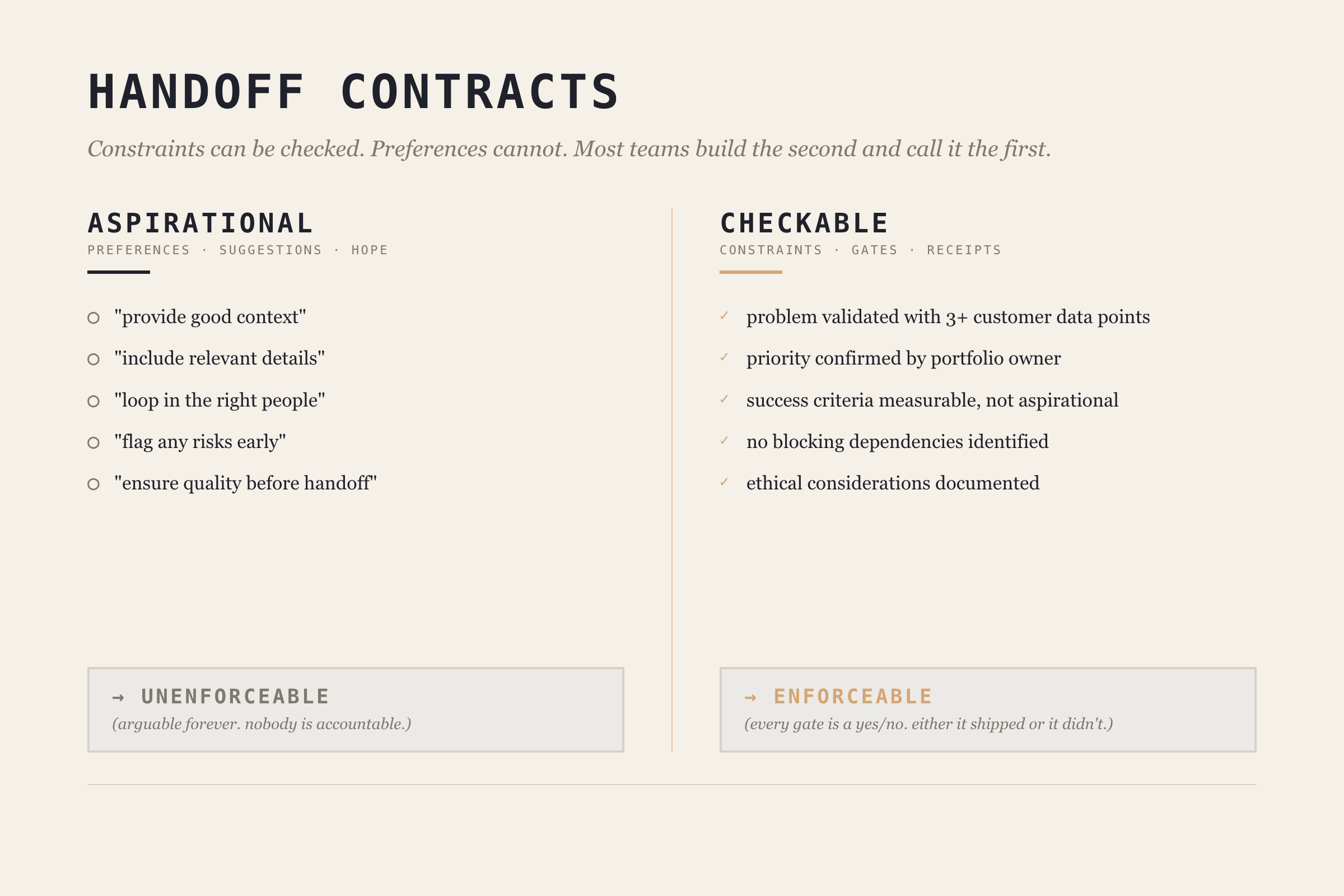
The fix is making handoff contracts checkable, not aspirational. Jones draws a critical distinction: constraints can be checked, preferences cannot. A handoff contract full of preferences ("provide good context," "include relevant details") is just a suggestion. A contract with constraints ("problem brief must include at least 3 customer data points," "no blocking technical constraints identified") is enforceable.
Before: "Write a problem brief for the architect."
After: "Write a problem brief. Must include: validated customer problem with at least 3 data points, business priority confirmed by portfolio owner, success criteria that are measurable, known technical constraints documented. No blocking dependencies identified."
Example (PM → Architect handoff at Discover → Decide boundary):
Handoff: Discover → Decide
From: PM OS
To: Architect OS

Required Context:
  - Problem brief with customer validation (min 3 data points)
  - Business priority signal confirmed by portfolio owner
  - Success criteria (measurable, not aspirational)
  - Known constraints (technical, regulatory, timeline)

Quality Gates:
  - [ ] Problem validated with customer evidence
  - [ ] Priority confirmed (not assumed)
  - [ ] No blocking dependencies identified
  - [ ] Ethical considerations documented

Trigger for Next Stage:
  - Architect acknowledges receipt
  - Decide stage scheduled within 48 hours
The contract works because each gate is a constraint, not a preference. You can check whether customer evidence exists. You can't check whether the brief is "good enough."
When to Delegate vs. Coordinate
Not every task within a Role OS needs the same level of oversight. Jones provides three sorting criteria:
| Factor | Delegate Autonomously | Coordinate Tightly |
|---|---|---|
| Error tolerance | Mistakes are cheap to fix | Correctness is non-negotiable |
| Tool span | Single tool/environment | Multiple tools, integrations |
| Independence | Task is self-contained | Pieces shape each other |
High error tolerance + single tool + independent = delegate and verify after. Low error tolerance + multiple tools + interdependent = coordinate with contracts.
Most teams default to one mode. The sorting framework lets you be deliberate about which tasks get which treatment. Your PM's market scanner can run autonomously with weekly human review. Your architect's infrastructure changes need tight coordination with handoff contracts.
Deep Dive: The Data PM Operating System
Let me show you what a complete Role OS looks like. I'll use the Data PM role. It's what I know best.
PM OS Overview
Purpose: Drive product strategy, prioritize work, synthesize stakeholder needs, and ensure team focuses on valuable problems.
Lifecycle Engagement:
- Discover: Lead
- Decide: Lead
- Build: Support
- Test: Support
- Ship: Consult
- Evaluate: Lead
PM OS Agents
1. Stakeholder Synthesizer
- Input: Meeting transcripts, Slack threads, email threads, survey responses
- Process: Extract themes, identify conflicts, map to stakeholder priority
- Output: Stakeholder landscape document with requirement matrix
- Oversight: PM reviews before sharing; flags conflicting requirements for human resolution
- Blast radius: Read-only. Cannot modify source data or send communications.
2. Market Scanner
- Input: RSS feeds, competitor announcements, industry publications
- Process: Summarize developments, identify relevance to current products
- Output: Weekly market brief with actionable signals
- Oversight: PM curates sources; marks high-importance signals for team attention
- Delegation mode: Autonomous with weekly review (high error tolerance, single tool, independent)
3. Feedback River
- Input: Support tickets, NPS responses, usage analytics, sales call notes
- Process: Aggregate, categorize, identify patterns, surface emerging themes
- Output: Continuous feedback synthesis with pattern alerts
- Oversight: PM validates patterns before they inform prioritization
- Delegation mode: Autonomous collection, coordinated interpretation (patterns need human judgment)
4. Pitch Shaper
- Input: Problem brief, team input, technical constraints
- Process: Structure into Problem → Appetite → Solution framework
- Output: Shaped pitch for betting table
- Oversight: PM drives; Architect reviews technical feasibility section
- Delegation mode: Coordinated (low error tolerance, multi-input, interdependent)
PM OS Context Scaffolds
The PM consumes context from six sources (leadership strategy quarterly, architect constraints per cycle, QA metrics weekly, analytics daily, sales weekly, support daily) and produces five outputs (problem briefs, shaped pitches, priority decisions, customer context summaries, and cycle learnings).
The key design decision: every input and output has a defined format and cadence. No ad-hoc "can you send me that thing?" The context scaffold turns informal information flow into a defined interface. (Full tables in the Data PM OS deep-dive guide, coming after this series.)
PM OS Handoff Contract
Here's what the PM → Architect handoff looks like as a checkable contract:
Contract: Problem Brief Handoff
From: PM OS → Architect OS
Stage: Discover → Decide

Required:
  - customer_problem: "Validated by evidence, not assumption"
  - evidence: "Min 3 data points (quotes, usage data, market signals)"
  - business_rationale: "Why this matters to portfolio"
  - success_criteria: "Measurable, not aspirational"
  - constraints: "Technical, regulatory, timeline"

Quality Gates:
  - [ ] Problem validated with 3+ customer data points
  - [ ] Priority confirmed by portfolio owner
  - [ ] Success criteria include measurable threshold
  - [ ] Ethical considerations documented

Trigger: PM publishes → Architect acknowledges within 24h → Decide begins within 48h
Every gate is checkable. "Validated with 3+ customer data points" is a constraint you can verify. "Good enough context" is a preference you can argue about forever.
The Org Structure Reality
Winter-Tear names the hidden cost: AI Translation Debt. The unpriced work of repairing meaning as it crosses organizational seams. For years, humans absorbed this cost. They carried context. They made judgment calls. They knew who to ask and when to stop.
Agents don't remove that dependence. They remove the time you used to have to hide it.
Role OSes are the mechanism for paying down Translation Debt explicitly. Instead of hoping experienced people will patch the gaps between roles, you design the interfaces so the gaps don't exist.
But none of this works if you pretend org charts don't matter.
Dylan Anderson puts it directly: "Fitting data into an organisation's structure is proving more complicated than most companies can handle." He identifies five structural challenges: ownership ambiguity, role evolution faster than org charts, executives who don't understand data capabilities, leadership vacuums (only 27% of leading organizations have a CDO), and corporate politics.
That last one is the killer. Anderson: "Corporate politics is the single biggest hindrance to an organisation making progress in its data capability."
Role Operating Systems don't solve politics. But they sidestep the problem. They define interfaces between roles, not between reporting lines. The PM OS doesn't care whether the PM reports to Engineering or Product. It cares about what context flows in and what flows out.
Build for interfaces, not for org charts. I've watched three reorgs at NeuroBlu. The reporting lines changed every time. The handoffs between PM and Architect? Same every time.
Building Your Role OS
You don't need to implement everything at once. Start with:
Step 1: Map Your Lifecycle Engagement
Which stages do you lead? Which do you support? This defines where your OS needs depth.
Step 2: Identify Your Key Handoffs
Where do you receive context from others? Where do you hand off to others? These are your critical interfaces. Pick the one where context loss hurts most.
Step 3: Build One Agent
Pick your biggest pain point. Build an agent that addresses it. Define its blast radius and oversight requirements before you define its capabilities. (I learned this order the hard way. My first agent was a feedback aggregator with write access to our product backlog. It helpfully created 47 duplicate tickets in one afternoon.) Run it for 2-3 cycles. Iterate.
Step 4: Define One Handoff Contract
Pick your most problematic handoff. The one where context always gets lost. Make it checkable. Document what constraints must be met, not what preferences you'd like. Hold both sides accountable.
Step 5: Sort Your Tasks
Use the delegation framework. Which tasks in your Role OS can run autonomously? Which need tight coordination? Be deliberate. Default to coordination for anything with low error tolerance or cross-role dependencies.
Step 6: Expand Gradually
Add agents as pain points emerge. Add handoff contracts as you encounter friction. Let the OS grow organically from real problems, not from a comprehensive design document.
Common Failure Modes
Over-Engineering
Building elaborate agents before proving simple ones work. Your first agent should be embarrassingly simple. Add complexity when you've earned it.
Under-Specifying Handoffs
Defining what context is "expected" without defining checkable constraints. If there's no gate, there's no accountability. Handoffs without gates are just suggestions.
Agents Without Guardrails
Jones again: "Either you can name what would make you say 'not yet,' or you're going to keep discovering 'not yet' after it's already shipped." This applies to agent design. If you haven't defined what "done" looks like in checkable terms, your agent will cheerfully produce work that looks complete and isn't.
Solo Optimization
Building a Role OS that makes you faster but doesn't help the team. If your outputs aren't in formats others can consume, you've just built a personal productivity tool. The whole point is composability.
Context Hoarding
Consuming context from others without producing context for them. Role OSes are bilateral contracts. If you take, you give.
What's Next
Part 4 covers The Integration Layer: how individual Role OSes compose into team execution through DPOS's five layers. Role OSes solve the coordination problem between two roles. The Integration Layer solves it across the whole team.
After the core series wraps, I'm publishing individual Role OS guides. The Data PM guide is first (it's half-written already, which tells you something about which role I think about most).
Read the rest of the DPOS series
- Part 0: Is Your Data Team a Dashboard Factory? — the diagnostic that started the series
- Part 1: The Data Product Operating System — the framework introduction
- Part 2: The DPOS Kernel — the principles every Role OS depends on
- Part 4: The Integration Layer (publishing soon)
- Part 5: Implementation (publishing soon)

Data Governance for Healthcare Data Product Teams in the Age of GenAI, Analysis, and Agents
A practitioner's guide to governed objects, executable data contracts, stewardship that ships, and why catalogs won't save you in the agent era.
The question behind the question
Someone asked me last month for "a data governance framework." What they wanted was a 40-page PDF they could hand to their CEO/CFO. What they actually needed was a way to make three decisions on Monday morning without the framework getting in the way.
That gap, between what governance documents promise and what governance decisions require, is where most healthcare data product teams are stuck right now. And GenAI is making it worse, not better, because agents hallucinate fluently when the underlying data is ambiguous.
This post is my working answer. Fair warning: I'm in the middle of this problem, not above it. If you find yourself nodding at the failure modes, welcome to the club.
Why healthcare data product teams get stuck
There are three things that make governance hard for healthcare data product teams specifically (and I'm oversimplifying, as usual).
First, the dual-customer problem. You're probably building for clinicians, analysts, and payers at the same time. A clinician wants an encounter record to mean the clinical event (when the clinician saw the patient). An analyst wants the same record to mean the billing event (the thing that generated a claim). A payer wants it to mean whatever produces the metric they report. None of them are wrong. But your data product has one encounter table, and if you don't pick a definition and enforce it, every downstream consumer builds their own shadow semantics. That's not a data quality problem. That's a governance scope problem.
Second, legacy thinking treats data as inventory. The old governance playbook says "catalog everything, label owners, run a committee." That works if your product is a warehouse full of reports. It breaks the moment your product is shipping queries, dashboards, or AI agents that have to be correct on a specific schedule. Dylan Anderson's been banging this drum on his Substack for a while (Issue #15 names the root causes, and "Business-Related Process Problems" plus "Underinvestment in Data Governance" are the two I see most often in healthcare). Inventory thinking can't handle product velocity.
Third, GenAI amplifies the failure mode. Agents are fluent, which is new. When you hand an agent ambiguous data, it doesn't throw an error. It generates a confident answer, cites your table, and moves on. A junior analyst who didn't know the difference between the clinical encounter and the billing encounter would at least hesitate. An agent won't. And the business will trust the agent more than the analyst, because the agent is faster.
If that doesn't scare you a little, I don't think we're reading the same industry.
You can't govern AI without governing data
This is the part I want to say loud and clear.
Over the last year I've watched teams stand up AI governance programs (model cards, bias audits, human-in-the-loop committees, the whole package) on top of data foundations that don't even have documented encounter definitions. The AI governance layer looks beautiful in a board deck. It fails the first time a regulator asks "why did your system say X?"
Dylan Anderson calls this the bolt-on problem in Issue #54, and it's the most useful frame I've seen for where most teams are right now. He argues that business model, data, and AI should be refactored together. Data is the active bridge between the business question and the model output, not a separate compliance domain. His earlier Issue #50 makes the same point more plainly: data governance to AI governance is a progression, not a replacement. You don't get to skip the first layer because you think AI is new and different.
In healthcare, skipping the first layer isn't a KPI miss. A wrong encounter record in a clinical data product is a patient safety incident waiting for a lawyer. HIPAA cares. The FDA cares (especially if you're anywhere near SaMD territory, Software as a Medical Device). Colorado and California have AI transparency laws on the books, and Texas, New York, and half a dozen other states are drafting their own. All of them converge on the same question: can you explain, audit, and reproduce what your system did? If you can't answer yes, the AI governance frameworks don't help you. They just make your compliance binder heavier.
So: ground floor first. Then the elevator.
Four moves a data product team can make this quarter
Here's the working framework I've been using. Frame this as a product operating model, not a corporate governance program. Four moves. All four are something your team can do this quarter without hiring a Chief Data Officer.
Move 1: Define the governed object
Not "our data." Specific entities your product promises are true.
In a healthcare data product, these usually look like: Patient, Encounter, Medication Order, Lab Result, Claim, Facility, Provider. Pick the 5-10 your product ships against. Write down what each one means in one paragraph. Business definition, not SQL definition. If you have two teams that would define Encounter differently, you don't have an Encounter entity. You have a scope problem. Fix that first.
Everything else (the 400 tables in your warehouse that nobody queries) is raw. That's fine. Raw data is allowed to be messy. Governed objects aren't.
Move 2: Write executable data contracts for those objects
This is where the governance-as-PDF approach gives up and the governance-as-code approach takes over.
A data contract is a formal, version-controlled agreement between the team producing a governed object and the teams consuming it. The contract specifies schema (columns, types, nulls allowed), freshness (how stale can this get before it's wrong), completeness (which columns must be non-null), cardinality (how many rows per day is normal), and business rules (an Encounter effective date cannot precede the patient's BirthDate, which is an actual rule I've shipped, not a theoretical one).
The critical word is executable. If your contract lives in a Confluence page, it's not a contract. It's a wish. Contracts fail pipelines. They fire alerts. They block deployments. They look like dbt tests, Great Expectations assertions, or dbt contracts. Pick the tool your team already uses and commit. Dylan Anderson's Issue #49 walks through implementation principles if you want a longer version of this argument.
Move 3: Name a steward for each object with a weekly job
This is the one that kills most governance programs. Teams assign "data owners" on an org chart, the org chart gets outdated, nobody notices.
Do something different. For each governed object, name a steward (ideally the subject-matter expert who'd be called when someone asks "what does this field actually mean?") and give them a recurring 30-minute weekly job. Pull the contract breaks from the last seven days and figure out which are real. Check the quality drift metrics on the 3-4 fields that matter. If any new business logic showed up during the week, update the rules file. That's the job. Thirty minutes. Standing on the calendar.
The weekly job matters more than the title. A Data Steward with no recurring work is a ceremonial title. A Data Steward with 30 minutes every Wednesday is a governance program.
Move 4: Instrument your agents against the contracts
This is the move that doesn't show up in Dylan Anderson's playbook, because it's the newest layer. It's also where healthcare data product teams have the most room to differentiate right now.
When an AI agent pulls from a governed object, log three things: the contract version it read against, the data freshness at query time, and a reproducibility hash of the inputs used to generate the output. Store those alongside the agent's response. If a clinician (or a regulator) asks three months later, "why did the system say this," you can answer in under an hour instead of under three days. That's the healthcare governance audit trail. And it's what connects Moves 1-3 to AI governance in a way that holds up under scrutiny.
This is also where data lineage tools and MCP-based data product interfaces are starting to show up. The specific tool matters less than the commitment to instrumenting every agent invocation against a named, versioned contract. Do that, and your AI governance program stops being paperwork and starts being code.
What GenAI and agents actually change
Most of what I've described is just good data engineering dressed up in governance clothes. The part that's new is what GenAI introduces on top.
Pre-GenAI, governance was about humans trusting data. Post-GenAI, it's about agents and humans trusting data, and humans trusting agents. That third layer introduces three failure modes I hadn't seen before, and healthcare teams need to plan around all of them.
Synthesis drift. An agent combines two governed sources in a way neither contract individually covers. Example: an agent joins Patient Demographics with Lab Result to produce a cohort summary and silently averages across populations with incompatible clinical baselines (different age groups, different comorbidity profiles, different baseline risk). Each source has its own contract. The synthesis doesn't. The FAVES framework from ONC (Fair, Appropriate, Valid, Effective, Safe) is a useful lens here, because it forces you to evaluate the output not just the inputs.
Context collapse. The agent loses provenance between upstream data and downstream claim. A clinician sees a recommendation. They can't trace it back to the data contract version that fed the model. By the time they ask "why this answer," someone has retrained the model, the underlying table has refreshed twice, and the agent has forgotten its own workflow. No audit. No reproduction.
Silent retraining. A model gets fine-tuned on ungoverned data somewhere upstream (a sandbox environment, a one-off analytics request, someone's exported CSV). The fine-tuning survives into production. Future outputs are now poisoned in ways nobody logged. NIST's CSF for AI and the WHO's guidance on large multi-modal models both call this out, and integrity checksums plus signed model packages are the current state of the art. Very few healthcare orgs are doing it.
The fix for all three isn't more process. It's executable governance artifacts the agent can read. Contracts the agent checks before querying. Observability the agent emits during querying. Lineage the agent writes after querying. If your governance program produces PDFs and not logs, your agents can't use it.
The practitioner's 5-question test
Here's what I ask myself (and what you should ask your team) before shipping anything AI-adjacent in a healthcare data product:
- Can you name the 5-10 governed objects your product promises? Not 200. A product with 200 governed objects has zero governed objects.
- Do those objects have executable contracts that fail the pipeline when they break? If the answer is "we have documentation," that's a no.
- Is there a named human whose weekly job (not org chart title) is those contracts? If the answer is "our data team" without an individual name, that's a no.
- When an AI agent uses that data, can you reproduce the output on demand? Contract version, data freshness, input hash. All three. If any are missing, that's a no.
- If a regulator asks "why did your system say X," can you answer in under an hour? Not under a week. Under an hour. With evidence.
If you can't answer yes to all five, you don't have a data governance problem. You have a product shipping risk wearing a governance costume.
What I'm still figuring out
A few things I don't have clean answers to, and would love to hear from folks who do.
How do you handle contract versioning when the clinical definition of an entity changes? It will change. SNOMED updates. ICD transitions. New regulatory definitions of "encounter." I have an opinion on this but not conviction yet.
Who should own the AI governance audit trail in a product org? Data engineering, ML engineering, or product? I've seen all three work and all three fail. My current bet is product, but I don't have a clean reason why.
At what stage of a data product's lifecycle does the cost of building out stewardship pay for itself? I suspect it's earlier than most teams think, but I can't prove it yet. If you've measured this, I want to see your numbers.
If you're working on any of this, drop me a note. I'd rather be in a conversation than publishing a framework.
Written from the practitioner chair, not the consultant seat. Citations are to Dylan Anderson's Data Ecosystem Substack, the foundational thinking I'm building on. Any bad takes are mine.

The DPOS Kernel: Principles for the AI Era
Part 2 of 5: The 15 principles that form the foundation of the Data Product Operating System. Seven philosophical beliefs about how data products work differently, and eight strategic principles for making decisions.
What Is the Kernel?
Klarna's AI customer service handled 2.3 million conversations per month. It cut resolution time from 11 minutes to 2. By every metric the team was tracking, it was a success.
Then Klarna hired 250 human agents back.
The AI worked too well. As Nate Jones puts it: "The distinction between AI that fails and AI that succeeds at the wrong thing is the most important unsolved problem in enterprise AI right now." Klarna had optimized for "resolve tickets fast" when the actual goal was "build lasting customer relationships." The system was executing flawlessly against the wrong intent.
Stuart Winter-Tear frames the underlying problem: "Autonomy is cheap. Bounded autonomy is the work." Every data team has access to capable AI, fast pipelines, and decent tooling. The scarce thing isn't capability. It's the control plane that turns capability into purposeful action, the set of principles that define what "right" looks like before the first line of code gets written.
That control plane is the kernel.
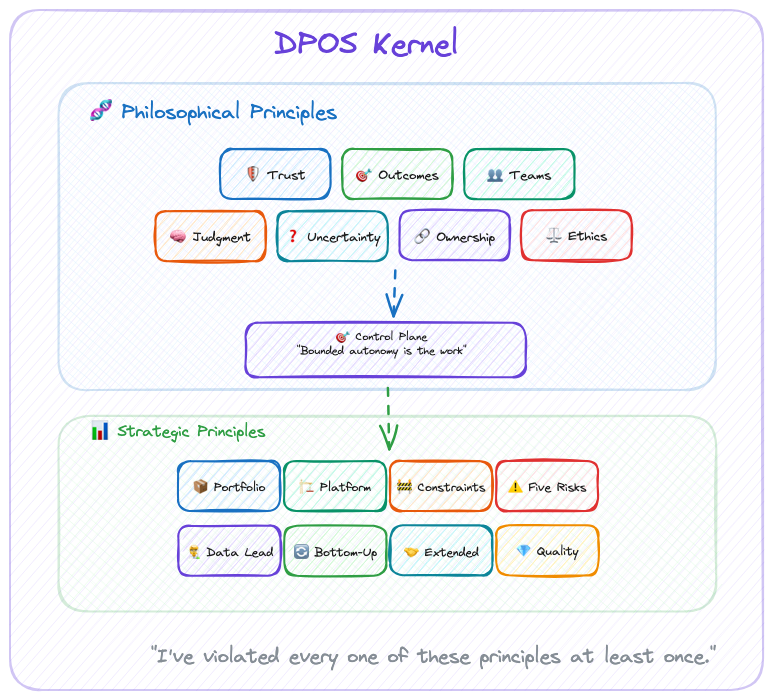
For DPOS, the kernel consists of two layers:
- Philosophical Principles: How we see the world of data products
- Strategic Principles: How we make decisions based on that worldview
These principles inform every decision, from team formation to technology choices to portfolio strategy. They work whether you're a solo builder or leading a 100-person data organization.
The modules adapt. The kernel never does.
The Seven Philosophical Principles
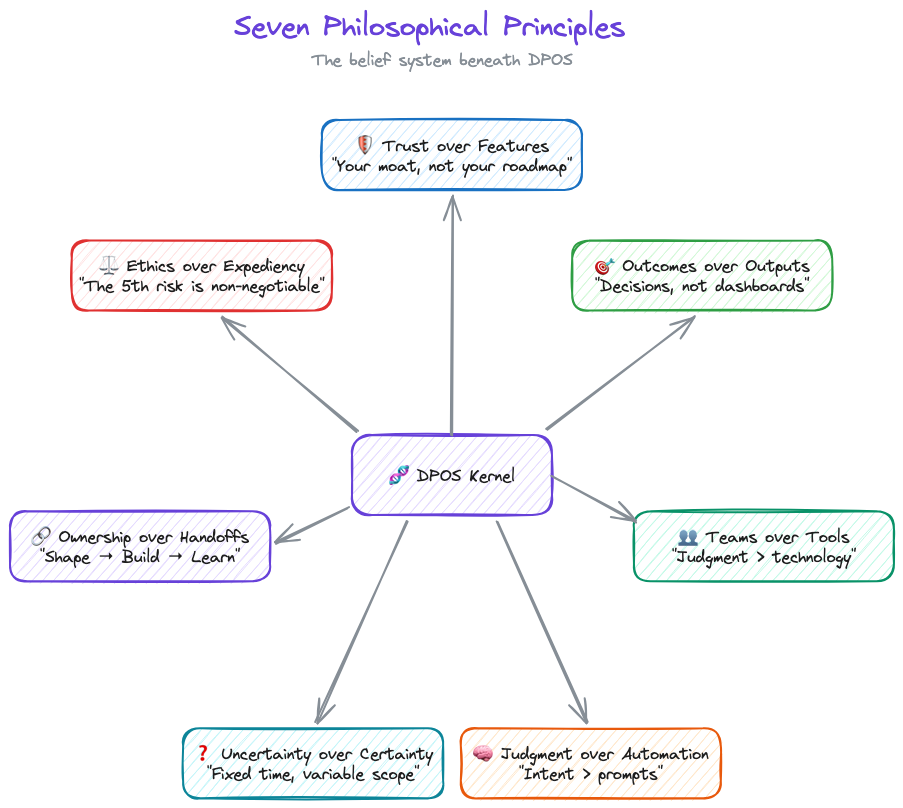
DPOS is built on seven core beliefs about how data products work differently. You'll disagree with at least one. That's fine. The point isn't agreement. It's having a position.
1. Trust over Features
Data products live or die on trust. A single data quality incident can destroy months of relationship-building. Every decision—from architecture choices to release timing—must prioritize trust preservation.
This isn't feel-good philosophy. It's economic reality. NeuroBlu's $6M ARR came from clients who trusted our data, not clients impressed by our ML algorithms. When one data quality incident cost us a $300K renewal, the lesson was permanent: features attract customers, but trust keeps them.
Last year I delayed a feature launch by two weeks to fix a lineage gap nobody outside the team would have noticed. My leadership was not thrilled. The client renewed. I'll take that trade every time.
2. Outcomes over Outputs
Data teams love showcasing capabilities: "Look at our 99.9% accuracy!" But customers buy outcomes: "I can make clinical decisions 3x faster."
One VP told me: "We have 47 dashboards and no answers." That's the difference between outputs and outcomes. The dashboards existed. The decisions didn't get easier. Somewhere along the way, the team optimized for "things we shipped" instead of "problems we solved."
The shift from "what our data can do" to "what our customers can achieve" separates successful data products from expensive science projects. Products deliver value; projects deliver outputs.
The fix is simple and uncomfortable: define what success looks like before you define what to build. Measure decisions made, not dashboards shipped. If your roadmap reads like a feature list instead of a value proposition, you're building a project, not a product.
3. Teams over Tools
After building $7M in data product ARR, I can tell you the technology was never the hard part. (I spent six figures on a BI platform that solved the wrong problem before I learned this.) DuckDB vs Snowflake doesn't matter if your team can't make good decisions. Getting the right people in the right roles, with clear ownership and strategic thinking, that's the 80% that determines success.
Tools are commoditized. Judgment isn't.
Before you debate DuckDB vs. Snowflake, ask: does your PM know what customers actually need? Does your data lead have authority to say "not yet" on a release? Get the people right first. The tools will follow.
4. Judgment over Automation
Nate Jones describes three layers of AI capability: prompt engineering (what to do), context engineering (what to know), and intent engineering (what to want). Almost nobody is building the third layer. That's where the failures live.
Klarna proved this. Great prompts, great context, zero intent alignment. Nobody encoded "build lasting relationships" in a way the system could act on.
I've trained 100+ executives on GenAI adoption. Every session proves the same point: teams that obsess over the technology fail. Teams that focus on the judgment framework, who decides, when to override, what requires human review, succeed. As Winter-Tear puts it: "Tools can encode clarity. They cannot create it." The judgment principle isn't about humans being better than AI. It's about clarity being a prerequisite that no tool provides automatically.
AI handles synthesis, pattern recognition, mechanical analysis. Humans handle strategy, ethics, and anything where context matters more than speed. And if AI starts eroding trust? You pull back. Speed you can recover. Trust you can't.
5. Uncertainty over Certainty
Data work requires exploration. You can't know if the data quality supports your hypothesis until you've tested it. You can't predict algorithmic bias until you've examined the training data.
Fixed time, variable scope respects this reality. Two-week sprints pretend data work is predictable. (It isn't. If your data scientist can scope a problem in two weeks, it wasn't a hard problem.) Six-week cycles acknowledge the uncertainty.
Shape for 2 weeks before committing to 6-week cycles. Make go/no-go decisions based on what you've actually discovered, not what the Gantt chart predicted. Success means "did we solve the problem?" not "did we finish the backlog?"
6. Ownership over Handoffs
The strategy-execution chasm kills data products. When the "strategy team" hands off to the "execution team," context gets lost and ownership fragments.
The people shaping the product are the people building the product are the people learning from customer feedback. No strategy consultants. No separate "architecture team." No handoffs. If that sounds impossible in your org, that's the diagnosis, not the objection.
7. Ethics over Expediency
The 5th risk—ethical data risk—is non-negotiable. When deadlines loom, teams cut corners on bias testing, privacy reviews, and transparency mechanisms. That's how algorithmic discrimination happens. That's how trust collapses.
Data Lead ownership of ethics isn't bureaucracy. It's insurance against existential risk.
Data Leads have authority to delay releases for ethical concerns. Bias testing, privacy review, and transparency mechanisms are never negotiable scope. Governance that enables speed, not bureaucracy that prevents it. But when ethics conflicts with deadlines, ethics wins. Every time.
Seven principles. Sounds clean. Maybe too clean. I've watched plenty of frameworks that look perfect in a blog post and collapse on contact with a real team. The honest version: I've violated every one of these principles at least once. Trust over Features is easy to say when you're not staring at a renewal deadline with a feature gap. Judgment over Automation is easy to say when the CEO isn't asking why you're not shipping faster with AI.
These principles survive not because they're comfortable. They survive because the cost of ignoring them was always higher than the cost of following them. Usually I learned that after the fact.
The Eight Strategic Principles
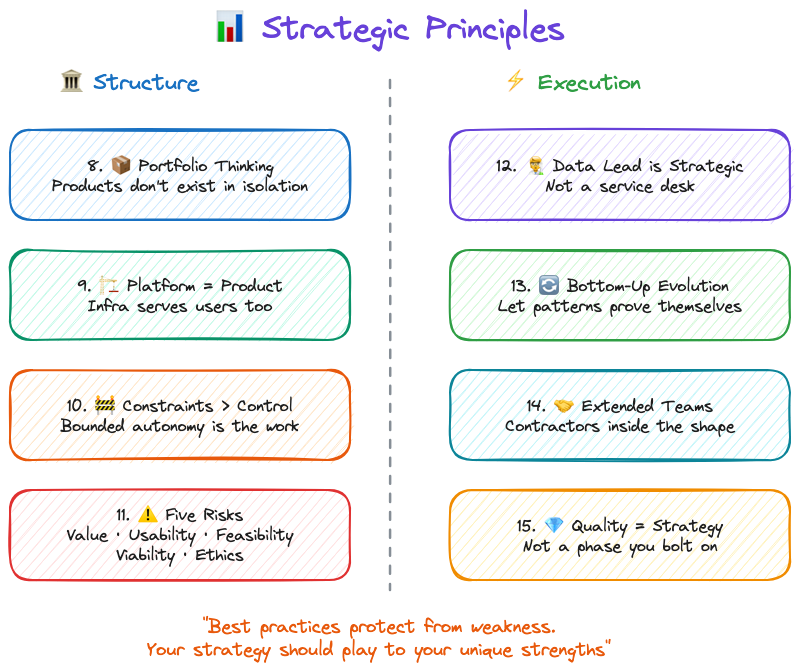
Philosophical principles are the beliefs. Strategic principles are what those beliefs look like when you're actually running a team.
One note before we get into these: the point of strategy is to be different. To find alpha. Copying best practices protects you from known weaknesses, but it doesn't play to your strengths. These strategic principles are a starting position, not a ceiling. If your team has a way of working that creates advantage nobody else can replicate, protect that. Don't sand it down because a framework told you to.
The Data Product Strategy Stack
Pichler's strategy stack goes from business strategy at the top to product backlog at the bottom. For data products, I add two layers he doesn't: portfolio strategy (because when data is both infrastructure AND product, individual strategies fragment without it) and platform strategy between portfolio and product (because your architecture IS your competitive moat, not just an implementation detail).
Everything else flows the same way. Except one thing: the flow is bidirectional. Discoveries from building, quality issues from shipping, feedback from customers, all of it flows back up to change strategy. Strategy that doesn't adapt to reality is just a slide deck.
8. Data Products Need Portfolio Thinking
When data is both infrastructure (shared platform) AND product (revenue-generating offerings), individual product strategies can create fragmentation, duplication, or competitive conflicts.
Portfolio strategy sets boundaries that enable product strategies to innovate.
I've watched this pattern across healthcare data companies at every scale. IQVIA, Truveta, Change Healthcare, Veradigm, all of them run multiple data products that share infrastructure but serve different markets. The ones that win have portfolio-level governance. The ones that don't end up with three teams building slightly different versions of the same cohort builder. At NeuroBlu, we had a healthcare data platform and provider network SaaS with unified trust frameworks but distinct product strategies. The portfolio layer is what kept them from cannibalizing each other.
Portfolio strategy sets data governance standards, trust frameworks, platform patterns, and cross-product sharing protocols. Product strategies determine target markets, value propositions, feature sets, and pricing models. Head of Data Products owns portfolio plus platform strategy. Product Squads own individual product strategies.
9. Platform Strategy Is Product Strategy
Traditional products can separate "product decisions" (features, UX) from "platform decisions" (infrastructure, architecture). Data products can't. Your data architecture IS your competitive moat. Platform decisions are business decisions.
CensusChat choosing DuckDB enabled sub-second queries on 44GB datasets, which enabled the product value proposition (instant insights from massive datasets). NeuroBlu choosing a columnar architecture enabled 30x data scale (0.5M → 32M patients), which enabled enterprise contract wins. Snowflake's architecture—separation of storage/compute, data sharing—IS their product differentiation, not just infrastructure.
Platform decisions get evaluated for business impact, not just technical merit. (If your CTO and your Head of Product haven't co-authored a roadmap, you have two roadmaps. That's worse than having none.) Technology roadmap and product roadmap are co-created, or they're fiction.
10. Alignment Through Constraints, Not Control
Top-down control kills innovation. Bottom-up chaos kills alignment. Portfolio strategy must balance both.
Dylan Anderson puts it plainly: "To succeed with Data Governance, organisations need one thing above all else: Structure. Without it, you will frustrate individuals and undermine the role governance should play." Structure doesn't mean bureaucracy. It means boundaries that enable speed.
Winter-Tear identifies what happens without those boundaries. Organizations survive on what he calls "tolerated vagueness," fuzzy ownership, undocumented escalation paths, informal workarounds that humans patch in real time. That works until you add AI or scale the team. Then, as he writes, "delegated systems don't simply accelerate the workflow. They accelerate the consequences of whatever ambiguity was already there."
Set boundaries, not mandates. Product strategies innovate within constraints.
For data products, constraints might look like: "All products must maintain 99.9% data accuracy" (trust framework), but how you achieve it is your choice. "Algorithmic bias testing required before production" (ethical data risk), but which testing methodologies you use is up to you. "Data lineage must be observable" (quality standard), but which lineage tools you choose is your call.
Portfolio strategy defines "what" must be true. Product strategies define "how" to make it true. Constraints enable autonomy by clarifying boundaries. Betting tables resolve resource conflicts across products.
11. Strategy Owns the Five Risks
Traditional product strategy addresses four risks (Marty Cagan): value, usability, feasibility, business viability. Data products add a fifth.
Product strategy must address the fifth risk with the same rigor as the other four.
Cagan's four are familiar: Value (will customers use it?), Usability (can they figure it out?), Feasibility (can we build it?), and Business Viability (does it work for our business?). Most teams address these, even if imperfectly.
The fifth risk is the one that gets skipped: Ethical Data Risk. Can we build trust while delivering value? This means bias testing, privacy review, transparency mechanisms, governance design. Owned by the Data Lead, not by committee.
Ethical data risk cannot be "addressed later" or "fixed in production." When risks conflict, speed vs. ethics for example, the Data Lead has authority to delay. Address it or don't ship.
12. Data Lead Ownership Is Strategic
Adding a Data Lead to the team seems like an operational decision. (It's not. It's the most strategic hire most data teams never make.)
Data Lead ownership of the 5th risk is strategic recognition that data products have different DNA.
Trust destruction is existential. A single data quality incident can destroy an entire product's market position. Ethical risk requires expertise—algorithmic bias, privacy, transparency aren't things product managers can "pick up." And there's no fallback position. If the Data Lead doesn't own ethical data risk, nobody does. It won't be owned by committee.
Roman Pichler talks about empowered teams having authority to create and evolve product strategy over time, offering three key benefits: fast decision-making and strategy-execution alignment, increased productivity, and value focus.
For data products, empowerment requires four pillars, not three: Product Manager (market & strategy), Tech Lead (architecture & implementation), Design Lead (UX & visualization), and Data Lead (data science, engineering, ethics).
Data Lead is present from strategy formation through delivery. Data Lead has veto authority on ethical concerns. Data Lead is accountable for trust metrics. If you don't have someone in this seat, ask yourself who's accountable for the next data quality incident. If the answer is "everyone," the real answer is no one.
13. Bottom-Up Strategy Evolution
Strategy that ignores reality fails. Top-down strategy that never adapts to discoveries is dogma.
Quality issues from building reveal portfolio gaps. Customer feedback reveals strategy pivots. Platform problems reveal architecture changes. The flow in the strategy stack goes both ways. Strategy is a living document, not sacred text.
14. Extended Teams for Extended Reach
Your core squad (PM, Tech Lead, Design Lead, Data Lead) doesn't have every expertise you need, so bring in legal, clinical, commercial, and compliance as collaborators early in shaping, not as gatekeepers late in approval.
At NeuroBlu, Legal identified HIPAA considerations upfront, not during QA. Medical Affairs validated the clinical value proposition before launch, not after. The difference between "we invited compliance to review" and "compliance helped us shape it" is about six weeks of rework.
15. Quality Is Strategy, Not Tactics
Dylan Anderson reframes quality in a way that changed how I think about it: "Data quality is an output, not an input. It is a symptom of numerous underlying root cause issues within the data ecosystem." Most teams treat quality as something to test for. Anderson argues that's backwards. "Tackling just 'data quality' will lead to potential short-term gain but continued long-term pain."
The numbers back this up. Gartner estimates poor data quality costs organizations an average of $12.9M per year. MIT Sloan puts it at 15-25% of revenue. That's not a QA problem. That's a strategic failure.
The root causes are systemic: broken business processes generating bad data at the source, multiple conflicting data sources with no reconciliation, no established basis for quality improvement, and chronic underinvestment in governance. You can test for quality all day. If the processes creating the data are broken, testing just documents the damage.
Quality as strategy means addressing root causes, not symptoms. Quality metrics are defined during strategy formation, not QA phase. Trust metrics sit alongside performance metrics in product dashboards. Data lineage is designed into architecture from day one. Continuous monitoring replaces checkpoint testing. Quality incidents trigger strategy reviews, not just bug fixes.
At NeuroBlu, "zero major data quality incidents" was a strategic goal, not a QA goal. Led to architecture decisions, redundant validation, observable pipelines, that differentiated us. CensusChat defined quality as "results match official Census reports exactly," which shaped architecture choice (DuckDB with validation layer) over faster options with potential discrepancies.
How the Principles Collide
Principles sound clean in isolation. In practice, they collide.
At NeuroBlu, a client wanted faster cohort generation. The fastest path skipped lineage validation. Trust over Features said no. The Data Lead flagged potential bias in the underlying patient selection. Ethics over Expediency said slow down. Meanwhile, the client was asking why this was taking so long. Outcomes over Outputs said: the outcome isn't speed, it's accuracy.
We took the slower path. Added the validation. Tested for bias. Shipped two weeks late. The client didn't mention the delay once. They mentioned three times that the numbers matched their internal validation. That's how these principles work: not as a checklist, but as a decision framework when the pressure is on and the easy path is wrong.
From Kernel to Execution: Role Operating Systems
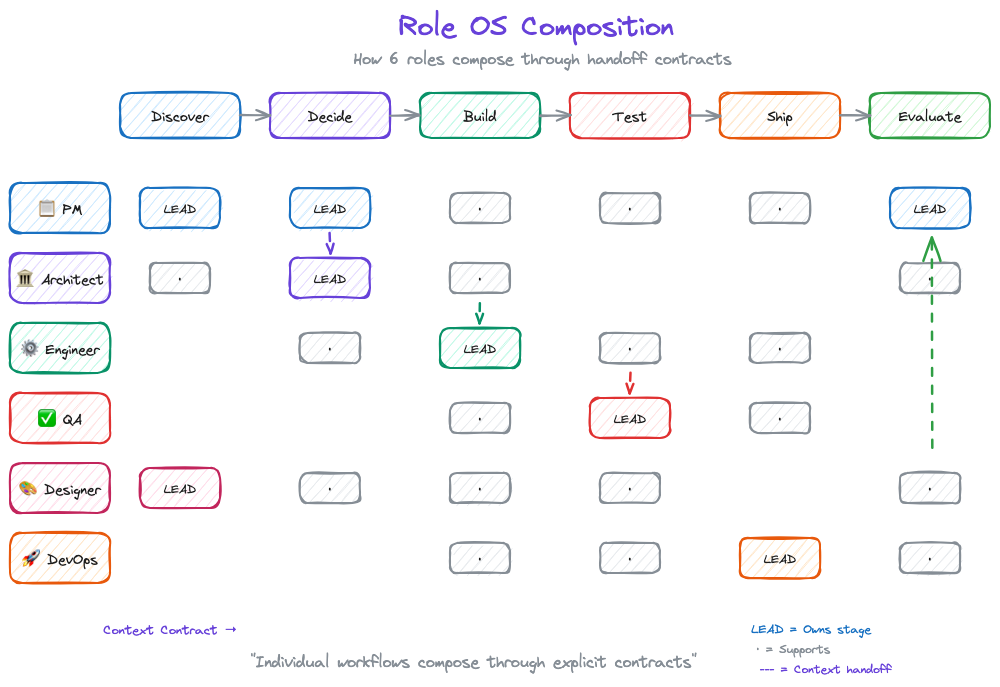
Principles are useless without execution. But here's what traditional frameworks get wrong: they jump from principles to team process. That's too big a gap.
Between "Trust over Features" (principle) and "Hold weekly quality reviews" (process) sits something critical: how individuals actually work.
DPOS v2 introduces Role Operating Systems, the layer between kernel principles and team execution.
What Is a Role OS?
Each role on a data product team operates with their own system: agents that assist them, context they consume and produce, workflows they follow. This is their Role OS.
Winter-Tear offers a sharp test for whether you've actually built one: "If you can name the workflow owner, the source of truth, the service level, and the audit trail, you are building an agent specialist. If you cannot, you are probably building a copilot, so set expectations accordingly." Role OSes are how you answer those four questions for every role on your team.
The kernel principles translate directly to Role OS design:
| Kernel Principle | Role OS Implementation |
|---|---|
| Teams over Tools | Shared context — Your OS feeds the team, not just you. The context you produce becomes input for other roles. |
| Judgment over Automation | Agents with oversight — AI assists at scale, humans decide at boundaries. Your agents handle mechanical work; you handle judgment calls. |
| Trust over Features | Deterministic where necessary — Handoffs need predictable outputs. Your Role OS guarantees quality at interfaces. |
| Ownership over Handoffs | Clear organization — Your OS owns specific lifecycle stages. You know what you're responsible for at each phase. |
The Six Role Operating Systems
DPOS v2 defines six roles, each with their own OS:
- Data PM OS — Strategy, prioritization, stakeholder synthesis
- Data Engineer OS — Pipelines, transformations, data quality
- Data Architect OS — System design, integration patterns
- QA/Data Quality OS — Testing, validation, quality gates
- Designer/BA/Visualization OS — UX, requirements, dashboards
- DevOps/App Engineer OS — Deployment, infrastructure, monitoring
Your team might have different names. You might combine roles. That's fine—what matters is that each role has a defined OS that composes into team execution.
How Role OSes Compose
Individual productivity isn't the point. Composition is.
Traditional methodologies assume everyone follows the same process. That's inflexible. Role OSes assume everyone follows their own process, connected through explicit handoff contracts.
PM OS (Discover) → Context Contract → Architect OS (Decide)
Architect OS (Decide) → Context Contract → Engineer OS (Build)
Engineer OS (Build) → Context Contract → QA OS (Test)
The team OS doesn't prescribe how each role works. It defines:
- The lifecycle stages (Discover → Decide → Build → Test → Ship → Evaluate)
- Which roles engage at each stage
- What context contracts connect them
This is what LLMs changed. Before, "my notes" stayed in my head (or my Notion). Now, structured context from your Role OS actually feeds team execution. Individual workflows compose—for real, not just in theory.
Part 3 goes deep on Role Operating Systems—what they contain, how to build them, and a complete example for the Data PM role.
If You Read Nothing Else
For executives: Your data team isn't failing—your methodology is. Stop measuring story points. Start measuring customer outcomes. The $300K we lost on one data quality incident taught me: trust is your moat, not features.
For data team leaders: The reason nobody sees your work is that Scrum ceremonies don't surface data value. These principles give you a language to explain what you do—and why it takes time to do it right.
For practitioners: It's not your fault that sprint planning feels like theater. Data work doesn't fit two-week chunks. These principles explain why, and Part 3 shows a different path.
Next up: Part 3 goes deep on Role Operating Systems. How each team member builds their own OS, and how those OSes compose into team execution through explicit handoff contracts.
Series Navigation:
- Part 1: Introduction
- Part 2: The Kernel (Principles) ← You are here
- Part 3: Role Operating Systems
- Part 4: The Integration Layer
- Part 5: Implementation
Is Your Data Team a Dashboard Factory?
Part 0 of 5: The Problem. The first dashboard I built at HCA got opened four times. Total. Not four times a day. Four times ever.
The first dashboard I built at HCA got opened four times. Total. Not four times a day. Four times ever.
I'd spent eleven days on it. Custom SQL, well-designed layout, clear KPIs. The clinical ops director had requested it specifically. She opened it twice, her deputy opened it once, and someone from finance clicked on it by accident. (I checked the access logs like a psycho.)
175 hospitals in that system. $1.2M in annual cost savings from the reporting automation program I eventually built there. But that first dashboard? Dead on arrival. Not because the data was wrong. Because nobody had asked what decision it was supposed to change.
I was a dashboard factory of one.
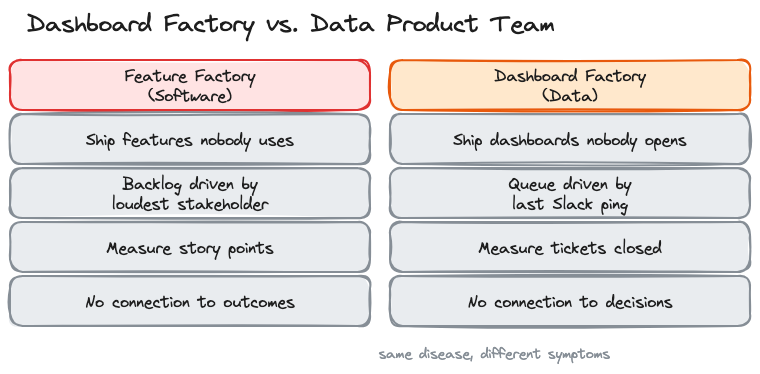
The Dashboard Factory
In 2016, John Cutler wrote "12 Signs You're Working in a Feature Factory" and product teams collectively flinched. The diagnosis was brutal: shipping features nobody asked for, measuring output instead of outcomes, no connection between what gets built and what moves the business.
Marty Cagan put it even sharper: "it doesn't matter how good your engineering team is if they are not given something worthwhile to build."
Data teams have the same disease. We just call it something different.
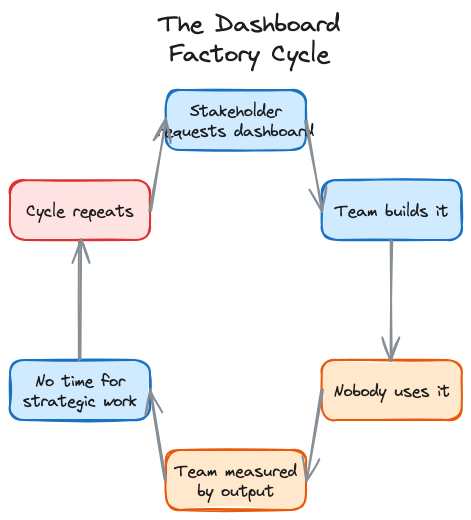
Instead of shipping features nobody uses, we ship dashboards nobody opens. Instead of a Jira backlog driven by the loudest stakeholder, we have a queue of ad hoc requests driven by whoever pinged us last on Slack. The metrics change (tickets closed per sprint instead of story points) but the dysfunction is identical.
Nick Zervoudis calls it a "service-oriented data team." Joe Horgan calls it the "dashboard factory operating model." I've lived in both versions. The pattern is the same: you build what people ask for instead of what they need. You measure how fast you build it instead of whether it changed anything. And quarter by quarter, the gap between your output and your impact gets wider.
The Diagnostic
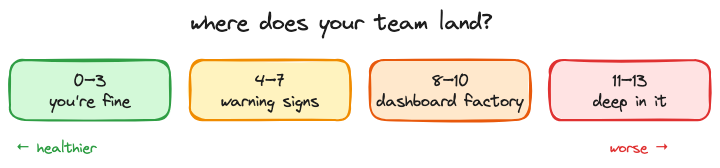
Zervoudis published 13 signs of a service-oriented data team. I've adapted them here with my own commentary. Score yourself honestly. If you hit 8 or more, you're deep in it.
1. Stakeholders ask for specific visualizations instead of help with business questions. They say "I need a bar chart of monthly revenue by region." they should be saying "we're losing market share in the southeast and I don't know why." the first request gets you a dashboard. The second gets you a data product.
2. You've built a large number of reports and dashboards, and suspect most aren't being used. At NeuroBlu, I audited our analytics platform and found that nearly half of dashboards hadn't been opened in 90 days. Nobody noticed they were gone when we archived them. Nobody.
3. You find out about upstream schema changes after something breaks. I got paged at 2am once because a vendor changed a field name in their API. No migration notice. No changelog. Our pipeline broke, and three downstream dashboards showed zeroes for six hours before anyone noticed. When your team is the last to know about changes that directly affect your work, you're not part of the system. You're downstream of it.
4. You spend hours every week playing "number detective." The CFO's number doesn't match the VP's number, which doesn't match yours. Same metric, three different definitions, and your morning is now a forensic accounting exercise instead of building the thing that would prevent this from happening again. At NeuroBlu, I spent more time reconciling conflicting metrics across teams than building the analytics that would have standardized them.
5. Stakeholders have forgotten they requested something by the time you deliver it. Three-week turnaround on a "critical" request. You deliver it, send the link, get back "oh, we already handled this a different way." the urgency was real when they asked. By the time you delivered, the decision had already been made without data. That's the tax of a reactive queue.
6. Your workload is ad hoc requests, not strategic projects. Look at your last two weeks. Count the hours spent on requests that came in via Slack DM versus hours spent on work your team planned. If the ratio is worse than 60/40 in favor of ad hoc, you're not running a team. You're running a help desk with SQL skills.
7. You don't know what stakeholders do with the data you give them. This one haunts me. I'll dig into this more in Part 1, but the short version: a join bug inflated our cohort numbers by 40% at NeuroBlu and a client's analyst found it in a board meeting before we did. They'd built their quarterly forecast on our numbers. I had no idea how the data was being used downstream because nobody's workflow included that feedback loop.
8. Your team doesn't own its own roadmap. If your roadmap is just a list of things other people asked for, it's not a roadmap. It's a delivery queue.
9. Your success is measured by outputs, not outcomes. Tickets closed. Dashboards shipped. Reports delivered. None of which tell you whether anyone made a better decision because of your work.
10. You call people outside the data team "the business." The language tells you where the divide is. If there's "the data team" and "the business," you've already lost. You're a service bureau, not a product org.
11. Your quarterly priorities are decided by someone else. Someone in leadership sets your team's goals. You execute them. You don't get to say "actually, the highest-impact thing we could do this quarter is X." your roadmap is a delivery queue with a fancier name.
12. You get requests after decisions are made. "we decided to launch this. Can you build the reporting?" that's the gut-punch version of every sign on this list. The decision happened without data. Your team gets called in for the cleanup. You're not informing strategy. You're documenting it after the fact.
13. You can't quantify the monetary value your team adds. If the CFO asked you right now what your team is worth in dollar terms, could you answer? Most data teams can't. And that's why they get treated as cost centers.
Why This Happens
Five root causes. All of them are organizational, not technical.
You're positioned as a service function. The data team reports into IT or engineering instead of product. That reporting line defines your purpose: you exist to serve requests, not to drive outcomes. Your budget gets justified by how many tickets you close, not by what decisions you changed.
Nobody applied product thinking to data. Cagan's four risks (value, usability, feasibility, business viability) apply to data products the same way they apply to software products. Most data teams skip the first two. They validate feasibility ("can we build this pipeline?") and viability ("does the infrastructure support it?") but never ask "will anyone actually change their behavior because of this?"
Your methodology was designed for software, not data. Scrum, Kanban, SAFe. All designed for teams that ship code. Data teams have different rhythms. A data scientist needs three to five weeks of exploration before she can even scope the problem. You force that into a two-week sprint and she either rushes the exploration or carries it across sprints until everyone loses track. The methodology doesn't fit, so the team works around it, and the workarounds become the process.
Handoffs are informal. Context travels through Slack threads, meeting notes, and tribal knowledge. When work moves from the PM to the data scientist to the engineer, critical assumptions evaporate at each boundary. The PM knows why this cohort was chosen. The data scientist knows what edge cases were excluded. The engineer knows neither. I've watched entire quarters of work collapse because of one implicit assumption that nobody documented. (I'll dig into the worst version of this in Part 1.)
Nobody owns the fifth risk. Cagan's framework includes four risks. Data products need a fifth: data ethics and quality. Who's accountable when a model performs differently across demographic groups? Who catches the bias before it ships? In most teams, that job belongs to everyone, which means it belongs to no one.
Here's what makes all of this hard to fix. Joe Horgan nails it: "operating as a dashboard factory is often hard-wired into data teams. Ad hoc changes won't stick in an operating model that's designed to frustrate them." you can't fix it by hiring better analysts or buying better tools. Chad Sanderson argues that data's core problem is trust and communication, not technology. He's right, but you also can't fix it by just telling people to communicate better. You need the structure that makes good communication the default.
The Escape Route
I've been building a system around this since late 2023.
It started with the handoff problem. Every failure I described above traces back to the same root: context disappearing when work crosses from one person to another. What if handoffs were contracts instead of conversations? What if every time work moved between roles, there was an explicit agreement about what context transfers, what assumptions are in play, and what needs to be true before the next person builds on it?
I call it DPOS, the Data Product Operating System. It's an operating model: the principles, practices, and contracts that define how a data team discovers, builds, ships, and evaluates data products. Each role keeps its own workflow. The contracts connect them. This is a five-part series covering the kernel principles, role-specific operating systems, the integration layer that connects them, and practical implementation paths for teams at different maturity levels.
So What
The hard part isn't building better dashboards. It's recognizing that the dashboards were never the product. The decisions they were supposed to enable? Those are the product.
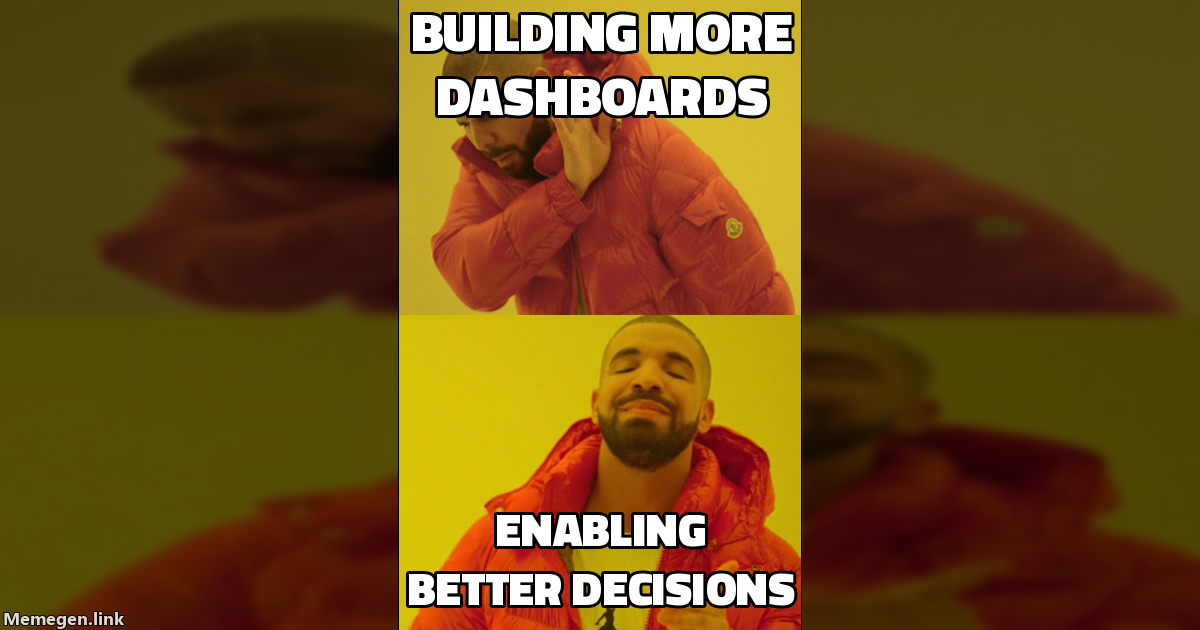
Dashboard factories don't need better dashboards. They need to stop being factories.
Next in series: Part 1: Introduction — The Operating System for Data Products
Series Navigation:
- Part 0: The Problem — You are here
- Part 1: Introduction
- Coming soon: Part 2 — The Kernel (Principles)
- Coming soon: Part 3 — Role Operating Systems
- Coming soon: Part 4 — The Integration Layer
- Coming soon: Part 5 — Implementation

DPOS: The Operating System for Data Products in the AI Era
Your day looks like this: standup, sync, planning, review, requirements. Somewhere in there you're supposed to actually analyze data. The system was designed for software teams, not data teams. DPOS fixes that.
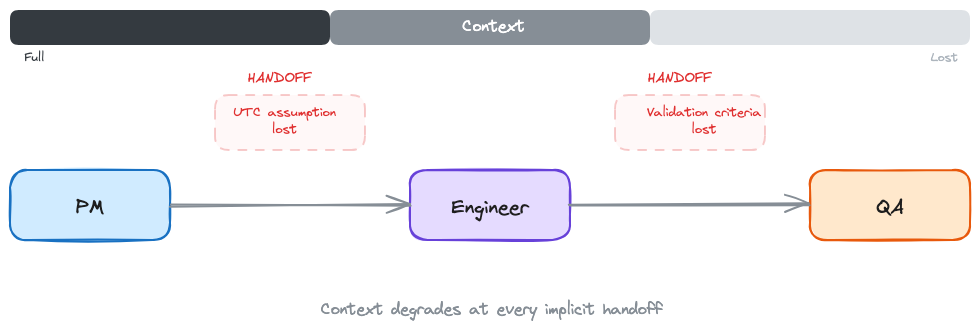
I once watched a three-month project fail because one team assumed UTC and another assumed local time. Nobody wrote it down.
That's not a code bug. That's a handoff failure. The PM's requirements became the engineer's spec, and somewhere in the gap, a critical assumption about date formatting vanished. Three months of work. One implicit handoff. Dead.
Data teams don't fail because they're slow. They fail because the space between roles is where context disappears.
The Pattern I Keep Seeing
I've built $9M+ in data product ARR across healthcare analytics, real-world evidence platforms, and clinical decision tools. Nine years. (Feels like twenty.) Multiple companies. Different team sizes, different tech stacks, different org charts.
The failure pattern is always the same: the handoffs.
At Revive, six months into leading the data product team, my data scientist looked at me mid-sprint and said: "We constantly plan but never finish. We keep pushing the interesting modeling work to the next sprint." Our designer added: "The UI keeps changing because we don't have time to explore visualization options properly." Our tech lead just nodded. He was too frustrated to talk.
Two-week sprints were fragmenting work that needed deep exploration. But the real problem wasn't the sprint length. It was that every time work crossed from one person to another, context leaked. Ask me how many retros it took to figure that out.
In a different role, I shipped a cohort analysis with a join bug that inflated numbers by 40%. Our client's analyst found it before we did. In a board meeting. They'd built their quarterly forecast on our numbers. Wrong cohort, wrong forecast, wrong resource allocation downstream. That's what happens when the handoff between building and testing doesn't include explicit quality contracts. Nobody's job to catch it, so nobody caught it.
It's Not Velocity. It's the Gaps.
Every methodology I've tried shares the same blind spot: they treat handoffs as informal conversations.
Scrum optimizes for delivery cadence. I've run Scrum with data teams at three different companies. Here's the pattern: the data scientist needs four weeks of exploration before they can even scope the problem. You force that into a two-week sprint and they either rush the exploration (bad) or carry it across sprints (which defeats the point of sprints). Meanwhile the engineer is waiting for a spec that doesn't exist yet because the scientist hasn't finished exploring. Context leaks at every handoff because nobody has time to document what they learned before the next ceremony starts.
Kanban optimizes for flow. But data products need quality gates, ethical review, and validation that don't fit a pull-based model. You can't just "pull" the next data quality check when you're ready for it. Sometimes the data quality check needs to block everything.
CRISP-DM assumes linear progression: business understanding, data understanding, preparation, modeling, evaluation, deployment. In practice, you discover requirements while building. You find data quality issues in production. You loop back constantly.
SAFe tries to solve coordination at scale. But the coordination overhead suffocates the exploratory work that makes data products valuable.
Each of these gets something right. Scrum's retrospective discipline. Kanban's work-in-progress limits. CRISP-DM's insistence on business understanding before modeling. Good ideas, all of them.
But they all assume handoffs happen through conversations. Tickets get passed. People sync up in meetings. Context travels through Slack messages that disappear in a week.
For software products, that works well enough. The code is the artifact. It either compiles or it doesn't.
For data products, the context IS the artifact. Why this cohort was defined this way. What assumptions went into the model. Which edge cases were intentionally excluded. Lose that context in a handoff, and you get a UTC bug that kills three months of work.
What If Handoffs Were Contracts?
That question changed how I run data teams.
What if every time work crossed from one person to another, there was an explicit agreement about what context transfers? Not a meeting. Not a ticket description. A contract: here's what I produced, here's what it assumes, here's what you need to know before you build on it.
For the engineer, this means not reverse-engineering stakeholder intent from a Jira ticket. The contract tells you what the PM's discovery actually found, what it assumes, and what edge cases were already considered. You build from what's written down, not from guessing what the PM meant.
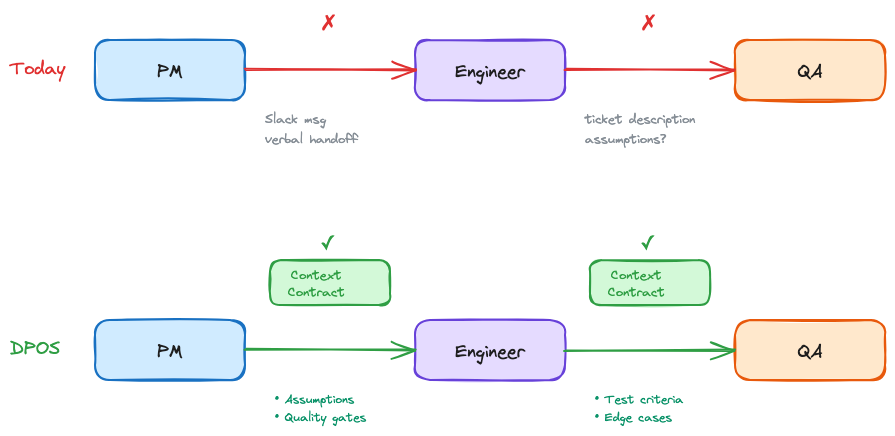
I've been building a system around this idea for the past two years. I call it DPOS, the Data Product Operating System.
DPOS works at two levels:
Individual. Each role on the team has their own operating system. The PM's workflow for synthesizing stakeholder feedback is different from the engineer's workflow for building pipelines. That's fine. Each person works the way they actually work, not the way a methodology prescribes.
Team. DPOS connects those individual systems through shared context at lifecycle boundaries: Discover, Decide, Build, Test, Ship, Evaluate. A set of principles that don't change (the kernel), and explicit handoff contracts that connect individual workflows into coordinated execution. The stages aren't the interesting part. The handoffs between them are.
Why Now?
DPOS is about explicit handoff contracts. You could implement these with shared docs, templates, or well-structured meeting notes. Before AI, I did exactly that. It worked, but the documentation overhead was brutal.
What's changed is that AI makes this cheap. At Holmusk, I ran 315 customer queries + questions through an AI analysis pipeline (Gemini) and got structured themes, segment breakdowns, and a prioritized issue list in 20 minutes. Before that, the same synthesis took me two hours of manual categorization. That synthesis becomes the handoff artifact my engineer actually reads, because it's specific enough to build from.
The documentation now happens as a byproduct of the work itself. AI makes DPOS faster. But the principles come first. The tooling is up to you.
What Makes This Different
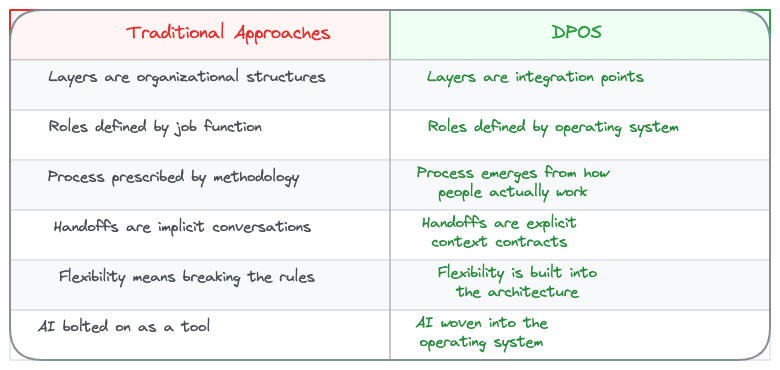
I've tried forcing teams into Scrum. I've watched CRISP-DM die slow deaths in organizations that adopted it on paper and ignored it in practice. I've seen teams "customize" Kanban until it was just a wall of sticky notes with no structure.
Stop making people fit the framework. Let the framework emerge from how people actually work.
What's Coming
This is Part 1 of 5.
- Part 2: The Kernel. Principles that never change. Trust over Features. Judgment over Automation. The philosophical and strategic foundation.
- Part 3: Role Operating Systems. How to build an OS for each team role. Deep dive on the Data PM OS as proof of concept.
- Part 4: The Integration Layer. How individual operating systems connect into team execution. Where this table gets the nuance it deserves.
- Part 5: Implementation. Getting started patterns for greenfield, brownfield, and AI integration paths.
After the core series: practical Role OS guides for each core data product role, with templates and real workflows.
So What?
Explicit handoff contracts sound obvious. So why doesn't every team do this?
Because the hard part isn't the contract format. It's the principles underneath. When a data scientist's exploration contradicts the PM's roadmap commitment, whose context wins? When a quality check reveals a problem two days before launch, does trust outweigh the timeline? (Spoiler: it does. I learned that one the expensive way.)
Part 2 is about the kernel: the principles that make those calls before the pressure hits.
Next in series: Coming soon: Part 2 — The Kernel (Principles)
Series Navigation:
- Part 0: The Problem
- Part 1: Introduction — You are here
- Coming soon: Part 2 — The Kernel (Principles)
- Coming soon: Part 3 — Role Operating Systems
- Coming soon: Part 4 — The Integration Layer
- Coming soon: Part 5 — Implementation
I spent four years in the Navy not as a pilot, but as the person telling pilots where to go.
The E-2C Hawkeye is an unglamorous aircraft. No missiles. No guns. Just a massive radar dome bolted on top and a crew inside watching screens. While fighter pilots got the glory, we saw the whole picture. Tracked contacts. Coordinated assets. Made the calls.
The pilot flew the plane. We directed the fight.

Ten years later, I realized I'd been training for something that didn't exist yet.
Recently I shipped features on two side projects and built a presentation automation tool for work. Something that would've taken months to spec and build. I still can't write production code.
What changed wasn't my technical skills—those remain bad. What changed was the feedback loop. The gap between having an idea and seeing it exist in the world collapsed from weeks to hours. Sometimes minutes.
 PMArchetype
The strange part? I don't understand most of what gets built. I can't read the code my tools produce. But I can read the output. I can see when something's wrong. I can steer.
I should be honest: the first few months were rough. I'd give vague instructions, get back something that looked right, ship it, and then watch it break in ways I couldn't diagnose. I once spent an entire weekend trying to fix an authentication bug that turned out to be a single missing environment variable. I didn't even know what an environment variable was.
But here's what I learned: the failures weren't random. They happened when I was lazy about constraints, when I assumed the agent understood context I hadn't given it, when I skipped the feedback loop because I was in a hurry. The failures taught me what the skill actually was.
Turns out, that skill matters now more than syntax ever did.
The Bottleneck Broke
The bottleneck that kept ideas trapped in non-technical heads just broke.
Three things converged at once:
Component libraries matured. The building blocks went production-grade. When the Lego bricks are that solid, assembling them becomes the easy part.
AI learned to wire things correctly. The boilerplate disappeared. The tedious glue work—state management, CSS alignment, all of it—tools handle that now. The gap from "design intent" to "working draft" used to be days. Now it's hours.
Platforms abstracted the hard parts. Authentication, databases, hosting, deployment—used to require specialized knowledge. Now they're checkboxes.
The result? If you can clearly express what you want, you can build it. Not because you understand how it works, but because you understand what you need and why.
Good prompting feels less like magic words and more like navigation.
You're not writing code. You're steering.
Everything I Needed to Know I Learned from StarCraft
Looking back, I'd been practicing this since I was eleven without knowing it.
Age of Empires. StarCraft. Command & Conquer. Total Annihilation. Warcraft (2 & 3).

In RTS games, you don't control every unit. You don't click each peasant to harvest each tree. You set rally points. You issue high-level commands. You manage resources and production. You scout the fog of war and make decisions with incomplete information.
You intervene when things go wrong—micromanage when you have to—but the goal is building systems that work without constant attention.
Great RTS players understand macro vs. micro. When to zoom out and think about economy and strategy. When to zoom in and control a critical engagement.
Working with AI agents is the same game. You're not typing code. You're issuing commands, managing context, setting constraints. You're building repeatable patterns that start every session consistently—build orders in RTS terms. You're scouting what the agent produces and intervening when it drifts.
I spent thousands of hours training for this in my parents' basement. I just didn't know it had a professional application. When I picked my Navy job, I chose the E-2C specifically because it felt like the real-world version of what I'd been doing since age eleven—watching the whole map, managing resources, calling the shots.
Three Builders Who Changed How I Think
I've been trying to understand who's actually succeeding in this new world. Not the hype—the people quietly shipping things that work. Three stood out.
Ben Tossel: The Practitioner
Ben shipped 50+ projects in four months. Used 3 billion tokens doing it. He can't read the code he produces, but he reads the agent output religiously.
— Ben Tossell (@bentossell) December 31, 2025
His workflow is deceptively simple: Feed context about what you're building. Switch into "spec mode" to pressure-test the plan. Question everything you don't understand. Then let the agent run while you watch and steer.
The part that stuck with me: "The fastest learning path is building ahead of my capability and treating bugs as checkpoints—fail forward."
He's not waiting to understand before he builds. He builds, hits problems, and learns from the gaps. The problems ARE the curriculum.
Sunil Pai: The Framework
Sunil applied Steven Johnson's "Where Good Ideas Come From" to agent work and landed on something useful: a map of where agents are strong and where they drift.
 Sunil Pai
Agents handle incremental steps—the "adjacent possible." Small diffs from what already exists. Pattern completion. Fast iteration on defined problems.
What they're weak at: anything requiring reality to push back. They'll generate plausible nonsense all day unless you give them constraints, context, and feedback loops.
His core insight: what changed across the week wasn't the model — it was the user.
The agent didn't get smarter. The person using it got more explicit about what they wanted.
Angus Chang: The Business Model
Angus built Bank Statement Converter. It takes PDF bank statements and converts them to CSV. That's it. The whole product.

It makes over $20,000 per month in profit with minimal maintenance. He launched during the Web3 hype. It grew through the AI hype. He ignored both trends and kept solving a boring problem for accountants.
The lesson I took: boring problems + simple solutions + fair prices = sustainable business. You don't need to chase what's hot. You need to solve something real and charge for it.
But the reason it works isn't his technical skill. It's his product judgment: picking a boring problem, keeping it simple, charging fairly, saying no to enterprise clients who wanted to own his roadmap. The code is table stakes. The navigation is the differentiator.
These three aren't traditional engineers. They're a new class of builder. And the skill they share has nothing to do with syntax.
The Navigation Stack
If agents make code cheap, what becomes expensive?
Sunil Pai's framework breaks it down:
![[navigation-stack.png]]
The formula: Constraints + Context + Oracle + Loop
Constraints aren't vibes. They're laws. What can't change? What breaks everything if the agent touches it? Write those down.
Context is what the agent needs to know about your world. Not generic best practices—your specific codebase, your conventions, your definition of "good." A portable instruction manual that follows you across projects.
Oracle means: how do you know when it's right? Not "looks good to me"—actual tests, benchmarks, something that creates a gradient toward truth. Hope is not a verification strategy.
Loop means small diffs, run checks, iterate. Not big-bang deployments. Tight feedback.
"Agents make code cheap," Sunil writes. "They don't make judgment cheap."
The scarce skill isn't typing. It's expressing constraints clearly. Designing oracles. Curating context. Running tight loops. Navigation.
What to Build: Simple, Lovable, Complete
Product people obsess over MVPs—Minimum Viable Products. Build small, ship fast, learn from customers.
The problem is most MVPs are too "M" and never actually "V." They're incomplete. Embarrassing. Customers don't want products that embarrass their creators.
Jason Cohen's alternative: SLC. Simple, Lovable, Complete.
Simple because complex things can't be built quickly, and you need to ship to learn.
Lovable because people have to WANT to use it. Products that do less but are loved beat products with more features that are disliked.
Complete because customers accept simple products but hate incomplete ones. v1 of something simple, not v0.1 of something broken.
Bank Statement Converter is the perfect SLC:
- Simple: One function. PDF in, CSV out.
- Lovable: Clean interface. Just works.
- Complete: Does the job on day one.
The pattern for the new technical class:
- Solve a problem you personally have
- Check if it applies to businesses (B2B beats B2C for revenue)
- Build the simplest complete version
- Make it lovable before feature-rich
- Charge fairly—and raise prices until the math stops working
Angus doubled his prices and made more money with fewer customers. Most people undercharge.
How to Start
If you're a PM, data leader, or analyst reading this and feeling the itch, here's where to start:
Pick one tool and go deep. Stop hopping between Cursor, Claude Code, Replit, v0. Pick one. Learn its patterns. The switching costs of tool-hopping exceed the benefits of the "best" tool.
Start with your own problems. Angus needed to track his spending. Ben needed internal tools. Your best ideas are already in your frustration list. What do you keep waiting for someone else to build?
Build your portable config. Create your version of agents.md or CLAUDE.md. Your preferences, your constraints, your definition of "good." Every session should start from your context, not zero.
Fail forward. Bugs are checkpoints, not failures. You don't study first and build later—you build and learn from the gaps. The problems are the curriculum.
Read the output, not the code. You're developing a new literacy. Watch what the agent does. Ask why when you don't understand. Close knowledge gaps as they appear. You won't become an engineer, but you'll become fluent enough to steer.
Ship complete before complex. One simple thing that works beats ten features that don't. SLC over MVP. If it's not lovable and complete, it's not ready—no matter how minimal.
Coordinator, Not Operator
In the Hawkeye, we had a saying: "The picture is the weapon."
It didn't matter how fast the fighters could fly or how many missiles they carried if nobody knew where to point them. The tactical picture—knowing where everything was, what it was doing, and what needed to happen next—that's what won fights.
The same is true now.
The AI is fast. It can write code I can't read. It can spin up features in minutes that would take engineering sprints. But it doesn't know where to point itself. It doesn't have the picture.
You do.
The question isn't "can you code?" It's "can you navigate?"
Can you see the whole battlespace? Can you express intent clearly? Can you set constraints that keep things on track? Can you intervene when things drift and let things run when they're working?
That's not engineering. That's command.
You've probably been training for it longer than you realize. Especially if you've been a PM or data leader. Coordinating stakeholders. Managing roadmaps. Understanding a domain deeply enough to know what should exist.
The tools finally caught up. The bottleneck broke.
What's the first thing you'd build if shipping was cheap?
You probably already know. It's the thing you've been waiting for someone else to build for you.
Stop waiting.

Last week I read Peter Yang's "25 Things I Believe in to Build Great Products."
 Peter Yang
His first principle? "Speed is the only moat."
I nodded. Then I stopped.
I've spent 9 years building data products in healthcare. Started at a consulting company in Nashville, worked for a massive health system, led analytics at a company scaling from Series A to exit, shipped three products solo in six months using AI tools.
Peter's framework is excellent—for most products - its awesome, honestly. But data products play by different rules so there is some nuance.
In software, the feature is the value. In data products, the data is the value. Different game entirely. You can't recreate context. You can't speed your way to a new workflow.
Here's what I actually believe. Some of this will sound obvious. Some of it contradicts what's popular. All of it comes from things I got wrong before I got them right.
Trust is Compounding
1. Trust compounds slowly and is destroyed instantly.
Morgan Housel wrote that
growth is driven by compounding, which takes time—but destruction is driven by single points of failure, which can happen in seconds.
That's data products in a sentence. You spend months building credibility. One bad number in front of the wrong executive and you're back to zero. I've seen it happen. I've caused it to happen.
2. Your data quality IS your reputation.
In SaaS, a bug is annoying. In data products, a wrong number is existential. When someone pulls a metric from your product and puts it in a board deck, your reputation is on the line. They don't remember the 47 accurate numbers. They remember the one that made them look foolish.
3. Credibility comes before features.
I used to think we needed more dashboards, more metrics, more capabilities. Wrong. What we needed was for people to trust the three dashboards we already had. Feature roadmaps don't matter if your users are double-checking your numbers in Excel.
4. Validation is not bureaucracy.
In my 20s as a data engineer/analyst, I resented data quality checks. They slowed us down. Then I shipped a cohort analysis with a join bug that inflated our numbers by 40%. The client's analyst found it before we did—in a board meeting. Now I don't ship anything without validation. It feels slow. It's actually the fastest path to trust.
5. Your users are experts — treat them that way.
Docs, nurses, seasoned healthtech sales reps, pharma leaders, and researchers know their domain better than you ever will. When they say a number looks wrong, they're usually right. I've learned more from users questioning my dashboards than from any product review. The skeptics are your best QA team.
Teams Need Operating Systems
6. Data products need the Product Squad, not the Trio.
The Product Trio (PM, Tech Lead, Design Lead) works for SaaS. Data products need a fourth seat: the Data Lead. Someone who owns data quality, data model, and data governance as first-class concerns. Without this, data quality lands on everyone—which means nobody actually owns it.
Learn more here Beyond the Product Trio - Why Data Products Need a Squad
7. Each role needs its own operating system.
I spent years trying to force Scrum onto data teams. It doesn't fit. Data scientists need deep exploration time. Data engineers need uninterrupted flow. Analysts need rapid iteration. One methodology doesn't work. Each role needs workflows tuned to how they actually think. (hint hint: more to come here)
8. Handoffs are where things break.
The interesting part of team coordination isn't the ceremonies—it's the handoffs. When the PM's requirements become the engineer's spec. When the analyst's insight becomes the designer's dashboard. I once watched a three-month project fail because the handoff between analysis and engineering lost a critical assumption about how dates were formatted. One team assumed UTC. The other assumed local time. Nobody wrote it down. Make these explicit. Document what context needs to transfer. Most failures trace back to a lossy handoff.
9. Ceremonies designed for software teams suffocate data teams.
Two-week sprints fragment data work that requires deep exploration. Daily standups interrupt flow states. Sprint planning assumes you know what you'll discover. You don't. Data work is exploratory by nature. Your process needs to accommodate that.
10. The best teams ship context, not just artifacts.
A data model without documentation is a liability. A dashboard without a data dictionary is a guessing game. The artifact is only half the deliverable. The context—why it exists, what it assumes, where it breaks—is what makes it usable.
 Kevin Holland
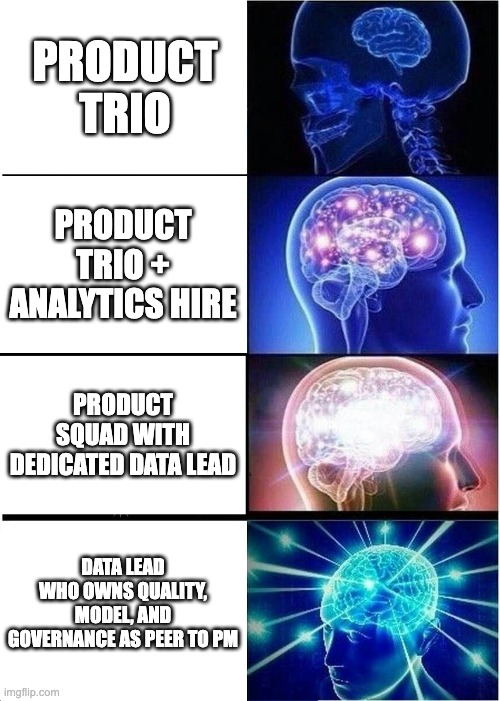
The Ground is Always Shifting
11. Data is alive, not static.
Software code does what it did yesterday. Data doesn't. Upstream systems change. Coding practices drift. New edge cases appear. What was clean last month is dirty this month. If your mental model assumes data is stable, you'll be constantly surprised.
12. Yesterday's clean data is today's mess.
I've never worked with a dataset that stayed clean. Every data product I've built eventually discovered data quality issues we didn't anticipate. Not because we were sloppy—because the world changed. A new hospital joined with different coding practices. A vendor updated their schema without telling us. A field that was always populated started coming in null from one site. We had a pipeline that ran perfectly for eight months, then broke because a single provider started entering diagnoses in a free-text field instead of using the structured codes. Stuff happens. Plan for it.
13. Build for change, not perfection.
In 2018, I tried to build "the perfect data model." Wasted four months. Now I build for change. Modular. Documented. Easy to extend. The perfect model doesn't exist because the requirements will evolve. Design for evolution, not permanence.
14. Governance is enablement, not control.
Data governance gets a bad reputation because it's usually implemented as a series of "no's." Good governance is actually a series of "yes, and here's how." It's documentation that helps people self-serve. It's guardrails that prevent mistakes without blocking progress.
15. Document like the future will question you.
Six months from now, someone will ask why a metric is calculated a certain way. If the answer lives only in your head, you've failed. Document your assumptions. Document your decisions. Document the edge cases you chose to ignore. Your future self will thank you.
Think in Value, Not Capabilities
16. Start with business impact, not data.
The biggest mistake data teams make is starting with "what data do we have?" instead of "what decision are we trying to improve?" I've built dashboards nobody used because we started with available data. Now I start with: what changes if this works?
17. Products over projects.
Projects end. Products evolve. When you treat data work as a project, you deliver something and walk away. When you treat it as a product, you own it through its lifecycle. You iterate. You respond to feedback. You improve. I once inherited a data warehouse that a previous team built as a "project" in 2019. That team was long gone by the time I arrived. Nobody understood why certain decisions were made. Nobody owned it. It was technically working but practically useless because nobody trusted it enough to use it. The product mindset is the difference between one-time value and compounding value.
 Kevin Holland
18. If you wouldn't charge for it, don't build it.
I ask myself this question constantly: "If we had to charge our internal stakeholders for this, would they pay?" It's a brutal filter. Cuts through a lot of "nice to have" requests. If the answer is no, maybe we shouldn't build it.
19. Reusability is a design constraint, not an afterthought.
Single-use data products are expensive to maintain and hard to justify. When I design something now, I ask: "Can this serve three use cases, not just one?" Sometimes the answer is no. But asking the question changes how you design.
20. Outcome-driven beats deliverable-driven.
I used to measure success by what we shipped. Dashboards delivered. Pipelines built. Models deployed. Wrong metric. Now I measure by outcomes changed. Decisions improved. Time saved. Revenue impacted. Shipping is easy to count. Impact is what matters.
Domain Expertise is the Moat
21. A nurse who can code beats a coder who doesn't understand nursing.
I've hired both. The domain expert who learned technical skills consistently outperforms the technical expert who tries to learn the domain.
(Actually, let me be more precise: consistently outperforms in the first two years. After that, the gap narrows. But most data products don't have two years to wait.)
Healthcare is complicated. Coding practices vary by system. Clinical workflows have nuance. We once had a data scientist with impeccable credentials build a model to predict patient readmissions. Technically flawless. But they'd included "arrival by ambulance" as a feature, which correlated strongly with readmissions. A nurse on the team pointed out the obvious: sick people arrive by ambulance. We weren't predicting readmission risk—we were predicting how sick someone was when they arrived. You can teach SQL. You can't quickly teach 20 years of clinical experience.
22. The business can't be Googled.
Technical problems have Stack Overflow answers. Domain problems don't. Understanding why a certain ICD-10 code is used differently across health systems isn't documented anywhere. This knowledge lives in people—clinicians, analysts, operational staff. Cultivate these relationships.
23. Healthcare doesn't work like tech.
Moves slower. Regulations constrain everything. Stakeholders are risk-averse for good reasons—mistakes hurt patients. I've watched people from consumer tech companies try to bring "move fast and break things" to healthcare. It doesn't work. The culture is different. The constraints are different. Adapt.
 Kevin Holland
24. Regulated context changes everything.
HIPAA isn't just a compliance checkbox. It fundamentally shapes what you can build, how you can build it, and who can access it. I've seen beautiful product ideas die because they required data sharing that wasn't legally possible. Know your constraints before you start designing.
 Kevin Holland
25. Your users know more than you—learn from them.
Healthcare analysts have spent years understanding their data, their systems, their edge cases. I approach every user conversation assuming they know something I don't. Because they do. The best product improvements I've made came from users who told me I was wrong.
These are lessons, not rules. Your context is different. Healthcare is different from fintech is different from e-commerce. Data products serving researchers are different from those serving operations.
But if I had to bet, I'd bet on trust over speed. On domain expertise over technical flash. On products that evolve over projects that end.
What do you believe about building data products that the industry hasn't figured out yet?
That's probably worth writing down. (I'm still figuring some of mine out.)

Last Thursday at 3pm, I coached a PM through her first 30 minutes in Claude Code. She'd never touched a terminal. By minute 7, she stopped being scared. By minute 20, she was synthesizing customer feedback across 12 call notes—something that used to take her half a day. By minute 30, she stopped asking permission to try things.
This isn't a coding tool. It's Claude, living on your computer. And once you see what it can do with your files, your meeting notes, your backlog of half-finished docs... you won't go back to copy-pasting into chat windows.
The Naming Problem
Claude Code shouldn't be named Claude Code.
The name scares PMs, analysts, and business folks. Recently, political analyst Matt Yglesias tweeted his shock at discovering Claude Code "is NOT just for developers." He's right to be surprised—and he's not alone. Most people see "Code" and think "not for me."
But here's what Anthropic actually shipped: browser automation, reading your files, persistent memory. The name is misleading. The capability is real.
Forget the name. Think "Claude Local"—an AI that lives on your computer and works where you work.
Three Ways to Use Claude
1. Claude in the app (what you probably already use)
You're having conversations. Writing summaries. Getting help with meeting recaps. It's chat, but smarter. No setup beyond your account. Best for quick questions and back-and-forth thinking.
2. Claude in Chrome (browser automation, no terminal required)
This one's newer. Claude lives in Chrome's side panel. It navigates websites, clicks buttons, fills forms. Think of all the repetitive browser work you do—competitive research, data entry, copying information from one system to another. Claude can do that while you watch.
Best for: Repetitive browser work. And here's the key—if you're terminal-averse, you can stop here. Path A. You'll save hours weekly from Chrome automation alone.
3. Claude Code (the terminal tool)
This is the full capability. Claude reads your local files without copying and pasting. Processes entire folders at once. Creates and edits files directly. Connects to Jira, Notion, databases.
Best for: Working with files and multi-step workflows. Path B for folks comfortable copy/pasting commands. This unlocks everything.
The Real Difference
File access and persistent memory.

When you ask chat Claude to "analyze my meeting notes," you copy-paste them. Token limits. Context loss. Tedious.
When you ask Claude Code to "read my meeting notes from this week," it actually reads them from your computer. No pasting. No limits. It remembers what you worked on yesterday.
Both paths are valid. If you only want browser automation, you never have to touch the terminal. If you want the full system—file operations, memory, integrations—the setup takes 5 minutes of copy/pasting commands.
Helen Lee Kupp (from Lenny's article): "I'm a mom who voice-records ideas during morning stroller walks, not a developer. The terminal interface? Overwhelming at first. But I discovered Claude Code isn't about coding at all."
Teresa Torres (product discovery expert): "Using Claude Code isn't about being technical. It's about being willing to try three to four simple commands."
Pick your comfort level. Start where it feels safe. You can always add more capability later.
The Memory Advantage
Here's why this matters: Chat Claude has amnesia. Every session starts from zero.
Claude Code has memory. A file called CLAUDE.md stores everything about your projects—your context, your preferences, even your voice. Next session? It remembers.
Before: "Let me re-explain my company, my role, my project, my constraints..." (every. single. time.)
After: Claude just knows. You start where you left off.
How it works is simple. CLAUDE.md is your project brain. It auto-loads when you start. You add to it over time. Claude references it before responding.
The problem isn't AI capability—it's context loss. Claude Code solves context loss.

The PM I coached? By session two, she'd added her project context, her stakeholder map, and her communication preferences to CLAUDE.md. Now when she asks Claude to draft an update, it already knows who she's talking to and what matters to them.
Teresa Torres runs her entire business this way—every morning, she types /today into Claude Code. It pulls tasks from Trello, generates a daily plan, and she's working. No re-explaining. No context loss. "You didn't have to remember how you did it last time. You didn't have to hunt for any files. You didn't have to copy and paste."
That's the transformation. You stop using AI as a question-answering service. You start building systems that get better over time.
Pick Your Path
Both paths work. Choose your comfort level.
Path A: Browser Only (No Terminal)
For: Terminal-averse folks who want browser automation without touching command line
Setup takes 5 minutes:
- Install "Claude for Chrome" extension from Chrome Web Store
- Pin the extension (click puzzle icon, then pin Claude)
- Open Claude side panel, sign in
- Critical safety setting: Choose "Ask before acting"
I learned this the hard way. The first time I used Claude in Chrome, I didn't enable "Ask before acting." Claude was... enthusiastic. It clicked through a form faster than I could verify the inputs. Nothing broke, but I didn't enjoy watching my browser move without my approval.
"Ask before acting" means Claude pauses at each step. Shows you what it's about to do. Waits for your thumbs-up. It's slower, but you'll sleep better.
What you can do:
- Fill forms from spreadsheet data
- Extract competitor pricing from websites
- Navigate admin panels and update records
- Pull data from dashboards into structured formats
The moment it clicks: When Claude fills a 20-field form while you watch, saving you 15 minutes of data entry.
Stop here if you want. This alone saves you hours.

Path B: Full Setup (Terminal + Optional Chrome)
For: Folks comfortable copy/pasting commands who want file access and persistent memory
Setup takes 5 minutes:
Step 1 - Install:
curl -fsSL https://claude.ai/install.sh | bash
That's it. One command. Copy it, paste it into Terminal (Mac/Linux) or Command Prompt (Windows), hit Enter. It installs everything you need.
Step 2 - Launch:
claude
Type claude and hit Enter. Claude Code opens. You're in.
Step 3 - Try your first prompt:
Summarize what files are in this folder and help me organize my thoughts on [current project]
The moment it clicks: When Claude reads your files without you pasting anything. No token limits. No context loss.
Optionally add Chrome integration: If you also want browser capabilities from the terminal, start Claude with claude --chrome and connect it to the Chrome extension. Now Claude can verify file work in actual browsers.
My recommendation: Start with Path A or B. Don't try to learn everything at once. Get one surface working, build confidence, then add more.
Key Concepts for Non-Coders
The One Pattern That Matters Most: Plan First, Execute Second
This is THE most important pattern in Claude Code: Always get the plan before the action.

Before Claude touches any files, browsers, or data—have it show you what it's going to do. Review the plan. Then approve execution.
Why this works:
- Catches Claude thinking "update all files" when you meant "update the draft file"
- Teaches you how Claude interprets your instructions
- Builds trust (you see the thinking before the doing)
- Saves hours of cleanup from well-intentioned wrong actions
How to do it (use this exact pattern):
[Your task description]

Before doing anything, show me your plan:
- What you're going to do
- What files/pages you'll touch
- What the output will look like

Do NOT execute yet. Just show the plan.
Then review the plan. If it looks right: "Proceed with the plan."
In Claude Code, Shift+Tab twice activates plan mode (Claude's built-in version of this). But you can also just add "show me the plan first" to any prompt.
Kevin's rule: Anything new? Always plan mode. It's never led me astray. It'll feel slow at first. It will save you 20 minutes of cleanup.
When I coached that PM, we used plan mode for everything the first session. By minute 15, she said "this is tedious." By minute 22, Claude had caught a misunderstanding in its plan—it was about to rename all her files instead of just organizing them into folders. She became a plan mode convert.
File Reading
Claude reads your docs directly—no pasting. Works better with markdown and txt than .docx (honestly, most things do). Point it at synced folders: Dropbox, Google Drive, OneDrive.
The PM I coached keeps all her customer call notes in Google Drive. They sync locally. Claude reads them there. No exports. No manual transfers. Just "read my customer calls from this week."
Agents vs Skills (Know the Difference)
Agents: Conversational hats you manually put on.
Create specialized agents for different contexts: "QA PM hat," "Leadership communication hat," "Engineering update hat." Each has a unique voice and focus. You invoke them—you choose which one to use.
The PM I coached created her first agent in under 5 minutes. She called it "Customer Voice." Its job? Always push back if her language gets too internal-focused. Always ask "would a customer understand this?"
Skills: Workflows that auto-activate when Claude recognizes context.
Unlike manually selecting an agent, Skills engage automatically when relevant. Your "meeting notes processor" Skill activates whenever you paste a transcript. Why this matters: Consistency without remembering to invoke it. Build once, applies forever.
Think of it this way: Agents are like putting on different hats. Skills are like trained habits Claude just does.
Start with agents. Skills are advanced, but once you nail a workflow, turn it into a Skill so it runs consistently every time.
5 Quick Wins for PMs
These aren't coding tasks. They're thinking tasks that Claude handles better than any chat interface.
1. Meeting Notes → Action Items (The Rigorous Version)
Here's what a detailed prompt looks like. The others can be simpler—this one shows you the pattern.
Read this meeting transcript and create a structured summary.

OUTPUT FORMAT (markdown):

## Meeting Info
- Date: [extract from transcript or write "not stated"]
- Attendees: [list names mentioned as present]

## Decisions
[ONE bullet per decision with format: Decision (who confirmed it)]

## Action Items
| Owner | Task | Due Date | Context |
[If no due date stated, write "TBD". If no owner assigned, write "unassigned"]

## Open Questions
[Unresolved items or items marked for follow-up]

## Risks or Concerns Raised
[Or write "None explicitly raised" if none]

## Slack-Ready Summary
[Exactly 3 sentences for someone who wasn't there]

RULES:
- Only include decisions that were actually confirmed, not just discussed
- Do NOT invent owners or due dates—only use what's explicitly stated
- If someone said "I'll do X," that person is the owner
- Distinguish "we should do X" (not a decision) from "we're going to do X" (decision)

PROOF (add this section at the end):
For each decision and action item, include a short quote from the transcript (max 15 words) that supports it. Format: "Quote" — [Speaker if known]

This lets me verify you captured things accurately.
Why this works: Explicit structure, rules for edge cases, proof for verification.
Time saved: 15-20 min per meeting. That's 1-2 hours weekly if you have 5+ meetings.
The others don't need this much detail—once you see the pattern, you can simplify. This one teaches rigor.
2. Document Synthesis Across Sources
Read all files in ~/Documents/CustomerCalls/ and tell me what patterns emerge across these conversations
Point it at 7 call notes. 12. 20. It doesn't matter—Claude reads them all and finds the patterns you'd miss staring at a spreadsheet.
Verification: Ask Claude to "Show me 3 specific patterns and list which files they came from." Spot-check a couple files to confirm the patterns are real, not hallucinated.
Time saved: Half a day → 10 minutes.
This is what made the PM I coached stop asking permission to try things. She had 12 customer call notes sitting in a folder (probably more like 15, but she'd lost count). Been meaning to synthesize them for two weeks. Felt like it would take hours. She asked Claude. Got patterns in 8 minutes. Verified them in 3 more. She looked at me and said "I can just... do this now?"
Yes. You can just do this now.
3. Technical Concept Ramping
Explain [technical thing] using the Feynman method. Break it down so I can have an informed conversation with engineering tomorrow.

My current understanding: [what you know]
What I need to discuss: [the decision or question]
This one's huge for PMs who feel intimidated in technical discussions. Claude won't just explain—it'll prep you with questions to ask.
Verification: After Claude explains, ask: "What's one thing I should clarify with engineering about this?" Tests whether Claude actually understood the concept or just paraphrased docs.
Time saved: The anxiety of walking into a meeting underprepared. (Hard to quantify, but real.)
4. Status Report Generation
Help me draft a status update for leadership.
What I accomplished: [bullets]
What I'm focused on: [current work]
Blockers: [if any]
Format: scannable, concrete, no fluff
Verification: Read the draft back and ask yourself: "Would I say this out loud to my boss?" If it sounds like AI-generated fluff, add: "Make this sound like I wrote it, not a bot."
Time saved: 20-30 min weekly. More importantly, your updates stop reading like corporate word salad.
5. Stakeholder Communication
Draft a Slack message to engineering about [decision/update].
Context: [what happened]
What I need from them: [the ask]
Tone: clear, direct, not self-congratulatory
That last line matters. Claude defaults to cheerful corporate-speak. Tell it not to.
Verification: Before sending, check the tone. If it has exclamation points or says "excited to share," rewrite. Engineering teams can smell AI-generated cheerfulness.
Time saved: 10-15 min per message, plus the draft usually needs less editing.
Two Tips That Matter
Dictation Changes Everything
Here's something that changed how I use Claude Code: I don't type most of my prompts. I dictate them.
Why it matters for non-coders: You think out loud faster than you type. When you're explaining context, constraints, and what you actually want, dictation captures it all.
How: I use WisprFlow (Mac app Talk through your context, it transcribes, paste into Claude Code. Other options: MacOS dictation, Superwhisper.
The PM I coached? She started dictating by minute 25. Her prompts got better immediately—more context, more specific asks. Turns out when you're talking instead of typing, you naturally explain things more thoroughly.

Structure Your Prompts
The difference between prompts that work and prompts that don't: Structure.
Vague fails:
Research competitors
Structured works:
Research the top 5 competitors to [Company] in [Industry].

For each, provide:
- Company name
- Founding year
- Estimated revenue range
- Key differentiator (one sentence)
- Source URL

Output as CSV.

Do not include companies outside [Geography].
If you can't find revenue data, write "Not disclosed" with a note explaining what you searched.
See the pattern? Tell Claude what you want, what format to use, what rules to follow, and how to prove it worked.
This is what turns "help me with X" into "produce Y in Z format with these constraints."
You don't need this level of detail for every prompt. But when a prompt fails, adding structure fixes it.
What NOT to Do
Common mistakes:
- Skipping plan mode on new tasks - Just... don't. It's 2 extra keystrokes that save you 20 minutes of cleanup.
- Using .docx files - Claude can read them, but markdown and txt work better. Convert when you can.
- Never clearing context - After a big task, type
/clear. Context accumulates. Claude gets confused. - Vague prompts - "Write a PRD" fails. "Write a PRD for healthcare provider workflow targeting hospital systems, focusing on scheduling" works.
- Never testing in plan mode first - New workflow? Always dry-run it before trusting Claude with 200 files.
Warning signs Claude is lost:
- References files that don't exist
- Repeats tasks you already completed
- Output starts contradicting itself
The fix: Type /clear and start fresh. Claude's context has limits—about 200,000 tokens. Long sessions fill that up. Sometimes you just need to reset.
The Mindset Shift
You're not learning to code. You're learning to direct an AI that happens to live in your terminal.

The terminal stopped being scary for her at minute 7. Maybe minute 10. Definitely before minute 15. She said "wait, I can just... ask it things?"
Yes. You can just ask it things. About your files. Your projects. Your computer. Your apps. Your half-finished docs that you've been avoiding.
Start here: Pick one prompt from the quick wins section. Try it Monday. See if you save 15 minutes.
This isn't just a productivity tool. The persistent memory, the agents, the file access—it's the beginning of a data PM operating system. A command center that remembers your projects, knows your voice, and scales your thinking.
But that's a story for another post.
What's the one repetitive task you'd love to never do again?
Resources
- Lenny's Newsletter: Everyone should be using Claude Code
- Teresa Torres: Claude Code - What It Is, How It's Different
- Teresa Torres: Full Tutorial - Automate Your Life with Claude Code
- Nate Jones: Claude Code Workflow Guide - Comprehensive setup and mental models (adapted for PMs in this post)
- Atlassian MCP Setup Guide
