Role Operating Systems: The Missing Layer Between Personal Productivity and Team Execution
Intelligence is getting cheaper. Coordination is not. Role Operating Systems close the gap between individual productivity and team execution.

Intelligence Got Cheaper. Coordination Didn't.
Stuart Winter-Tear nails it: "...intelligent got cheaper. Coordination did not. People do not want agents. They want outcomes with less friction."
Everyone's building personal operating systems. Daniel Miessler has Telos. Nate Jones has his Chief of Staff/OpenBrain system. Productivity Twitter pushes second brains, zettelkasten, and AI-augmented workflows. The tools keep improving. Claude, GPT, local LLMs, agent frameworks.
Individual capability is through the roof. Coordination overhead hasn't budged.
You optimized for your productivity. But you work on a team. The more productive you got individually, the more the team friction showed. Your brilliant notes stayed in your system. Your insights never reached the people who needed them. You got faster at working alone while the handoff gaps widened.
Here's the math that nobody talks about: every person on the team got 3x faster, and the team got maybe 1.2x faster. The delta is coordination waste.
Role Operating Systems exist to close that gap.
The Composition Problem
I watched a feature die at NeuroBlu because of a handoff. Our PM spent three weeks with pharma clients, understood exactly what they needed for their schizophrenia trial data, wrote a detailed brief. The architect got a 30-minute walkthrough and built what he thought he heard. Six weeks and roughly $40K in engineering time later: technically solid feature, completely wrong problem. The PM's context about why the client needed cohort-level breakdowns (not patient-level) never made it across the gap. I was the PM. The brief was mine.
My NeuroBlu break wasn't unusual. It's the rule. Every handoff is a compression step:
- PM to Architect: rich customer context becomes a 2-page brief and 30 minutes. 80% of why-this-matters, gone.
- Architect to Engineer: technology trade-offs become diagrams and ticket descriptions. The alternatives considered, gone.
- Engineer to QA: edge cases and assumptions become a test environment and stale docs. The mental model that explains why it works, gone. This isn't just a feeling. Jeremy McEntire ran controlled experiments with multi-agent AI systems, no humans involved, and watched performance collapse with each boundary added.
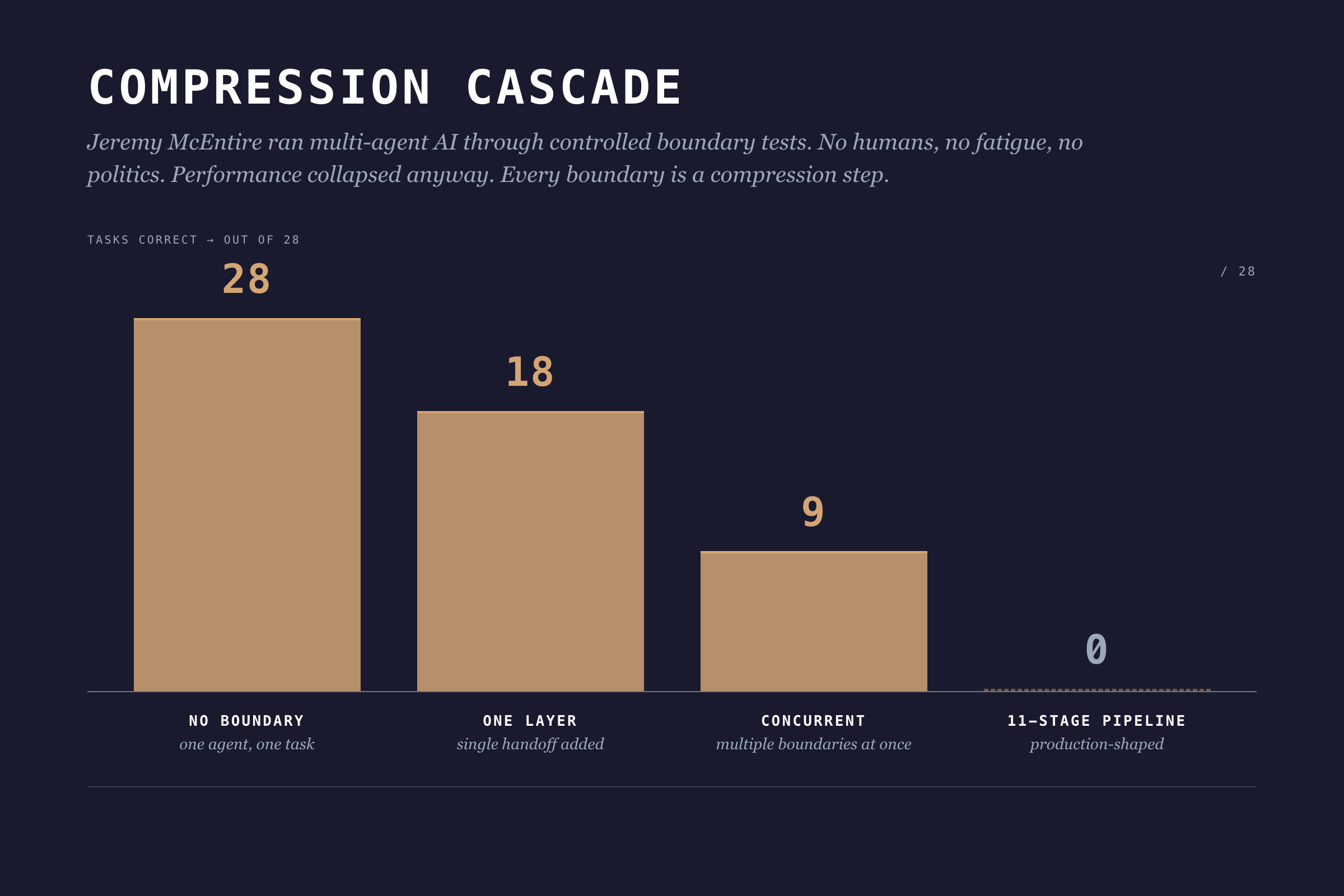
One agent, no boundaries: 28 out of 28 tasks correct. Add one boundary layer: 18. Add concurrent boundaries: 9. An 11-stage pipeline: 0 out of 28. Zero. No ego, no fatigue, no office politics. Pure architecture.
Information theory has a name for this: the Data Processing Inequality. In any chain X → Y → Z, Z can never have more information about X than Y does. Every boundary is a compression step. Information gets destroyed. Adding more process layers can't fix it.
I wish I'd known this three years ago. I kept scheduling more review meetings, thinking more touchpoints would fix the context loss. They didn't. I was adding overhead to the compression.
The underlying problem: individual workflows produce outputs optimized for the individual, not for the team.
Role Operating Systems: A Different Approach
What if individual workflows were designed to compose?
A Role Operating System flips the productivity question. Instead of "how do I work more effectively?" it asks "how does my work feed the team?"
Each role gets their own OS: agents, context scaffolds, workflows. But here's the twist: each OS is designed with explicit interfaces. What context does this role consume? What does it produce? At which lifecycle stages?
I call this composable individuality. (I made that up. I'm not 100% sure it's the right term but nobody's proposed a better one yet.)
You still work how you work. Your agents assist with your tasks. Your workflows match your thinking style. But the outputs conform to shared contracts that other roles can consume.
Winter-Tear offers a clean test for whether you're actually building something composable: "If you can name the workflow owner, the source of truth, the service level, and the audit trail, you are building an agent specialist. If you cannot, you are probably building a copilot."
Role OSes are how you answer those four questions for every role on your team.
The Lifecycle: Six Stages
Skipping Decide costs more than skipping Discover. By the time you've built the wrong thing, you've burned the team's trust along with the budget. The lifecycle isn't bureaucracy. It's where compounding mistakes get caught.
DPOS uses a six-stage lifecycle:
1. Discover
What happens: Problem identification, market research, user feedback synthesis, opportunity assessment.
Key question: What problem are we solving, and is it worth solving?
Output: Problem brief with validated customer need, market context, and preliminary feasibility signals.
2. Decide
What happens: Architecture selection, scope definition, risk assessment, resource allocation.
Key question: Should we build this, and how?
Output: Shaped pitch with defined approach, appetite (time budget), and go/no-go decision.
3. Build
What happens: Implementation, data pipelines, feature development, integration work.
Key question: Can we deliver this within our appetite?
Output: Working components with documentation and test coverage.
4. Test
What happens: Validation, quality checks, ethical review, user acceptance.
Key question: Does this work correctly and responsibly?
Output: Validated release candidate with quality metrics and risk assessment.
5. Ship
What happens: Deployment, monitoring setup, launch coordination, customer communication.
Key question: Is this ready for production?
Output: Live product with observability and rollback capability.
6. Evaluate
What happens: Usage analysis, feedback synthesis, impact assessment, iteration planning.
Key question: Did we solve the problem, and what's next?
Output: Learnings document with validated outcomes and next cycle priorities.
The Role x Lifecycle Matrix
Different roles engage at different stages. Here's how they compose:
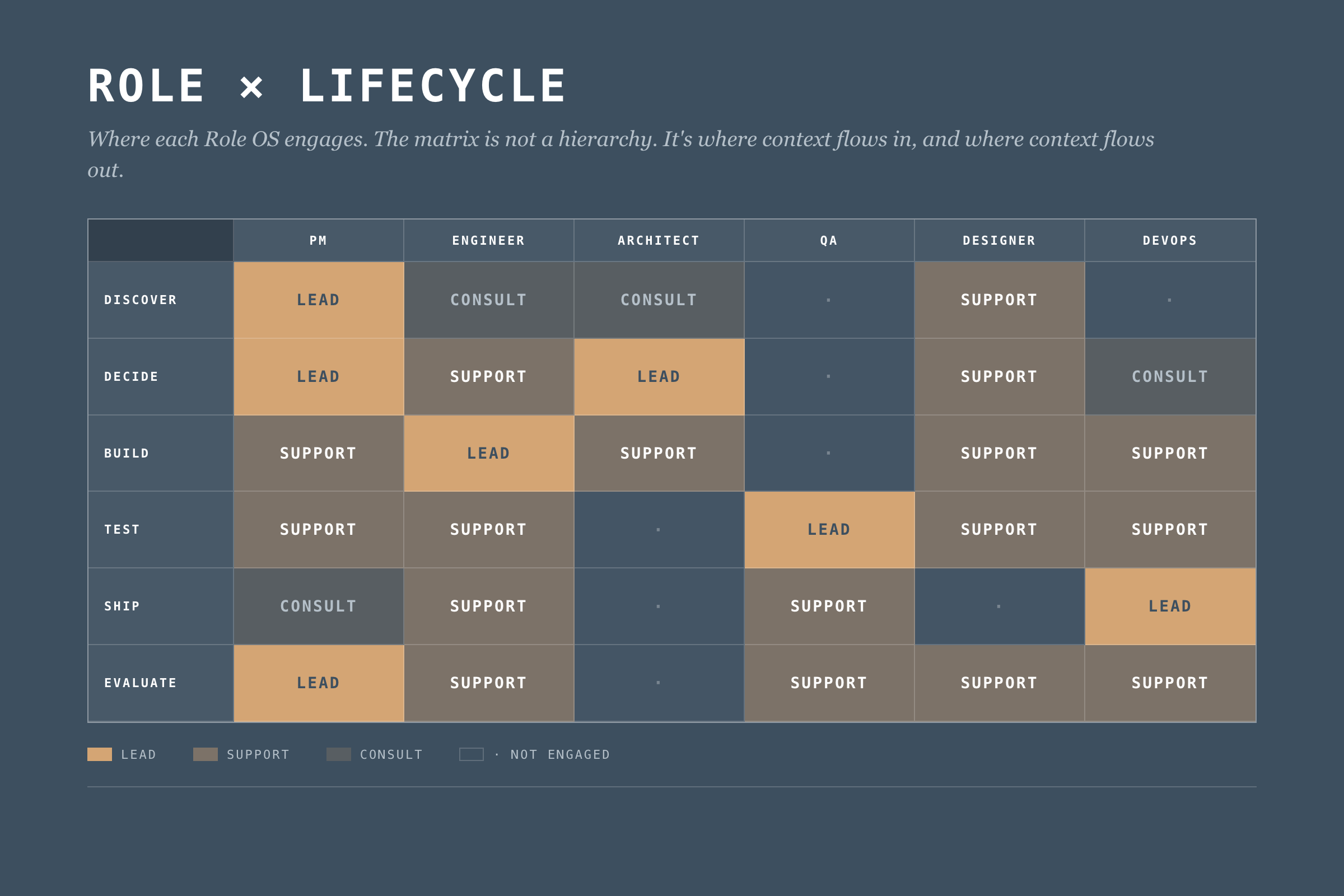
This matrix defines where each Role OS engages. But engagement isn't enough. We need explicit context flows.
What Makes a Role OS
A Role Operating System has four components. Most teams start with agents. Wrong order. Start with handoffs, end with agents. I'm presenting them in the order most readers want to read them, not the order you should build them. The "Building Your Role OS" section at the end has the right sequence.
1. Agents
AI assistants tuned to the role's work. Not generic chatbots. Specific agents for specific tasks.
Example (Data PM):
- Stakeholder Synthesizer: Processes meeting notes, extracts themes, identifies conflicting requirements
- Market Scanner: Monitors competitor activity, synthesizes industry trends
- Feedback Analyzer: Aggregates customer feedback, identifies patterns across channels
- Pitch Shaper: Helps structure problem/appetite/solution for betting table
Each agent has defined inputs, outputs, and oversight requirements. The PM reviews stakeholder synthesis before it feeds decision-making. The feedback analyzer flags low-confidence patterns for human verification.
But oversight isn't optional decoration. Nate Jones documented a case where an experienced engineer's coding agent deleted 2.5 years of production data. Not a junior mistake. An architectural one: too much write access, no rollback verification, no blast radius limits.
Five constraints every Role OS agent needs:
- Defined blast radius before running any write operation
- Read-broad, write-narrow access by default
- Irreversibility assumed unless explicitly proven otherwise
- Staged environments for mutations (staging first, production second)
- Explicit confirmation for destructive actions (never implicit)
An agent that can do damage at the speed of AI needs guardrails that work at the speed of AI. Reviewing the output after doesn't help when the data is already gone.
2. Context Scaffolds
The boring component that decides whether the OS works. What the role knows (consumes) and what the role provides (produces).
Context In (Data PM):
- Business strategy and portfolio priorities (from leadership)
- Technical constraints and platform capabilities (from Architect)
- Quality metrics and trust status (from QA/Data Lead)
- Customer feedback and usage patterns (from Product Analytics)
Context Out (Data PM):
- Problem briefs (to all roles)
- Shaped pitches (to Architect, Engineering)
- Prioritization decisions (to all roles)
- Customer context summaries (to Designer, Engineer)
Context scaffolds make dependencies explicit. If the PM needs technical constraints from the Architect, that's a defined interface. Not a Slack message at 4pm on Friday.
3. Workflows
Workflows fail where they're least visible, in the parts you assumed everyone knew. How the role moves through lifecycle stages.
Example (Data PM Discover Workflow):
1. Trigger: New cycle begins OR significant feedback pattern detected
2. Gather: Pull latest customer feedback, market data, stakeholder inputs
3. Synthesize: Run Stakeholder Synthesizer and Feedback Analyzer agents
4. Validate: Review agent outputs, flag uncertainties, verify with sources
5. Frame: Draft problem brief with customer need + market context
6. Share: Publish problem brief to Context Out interfaces
7. Handoff: Schedule Decide stage kickoff with Architect
Workflows define the rhythm. They adapt to circumstances. But they keep key steps from getting skipped and make handoffs explicit instead of assumed.
4. Handoff Contracts
This is where most teams fall apart, and where the biggest gains live.
Jones puts it bluntly: "Most teams are treating agents like interns: throw tasks over the wall, hope the summary is honest." He's talking about AI agents, but the same pattern describes most human handoffs.
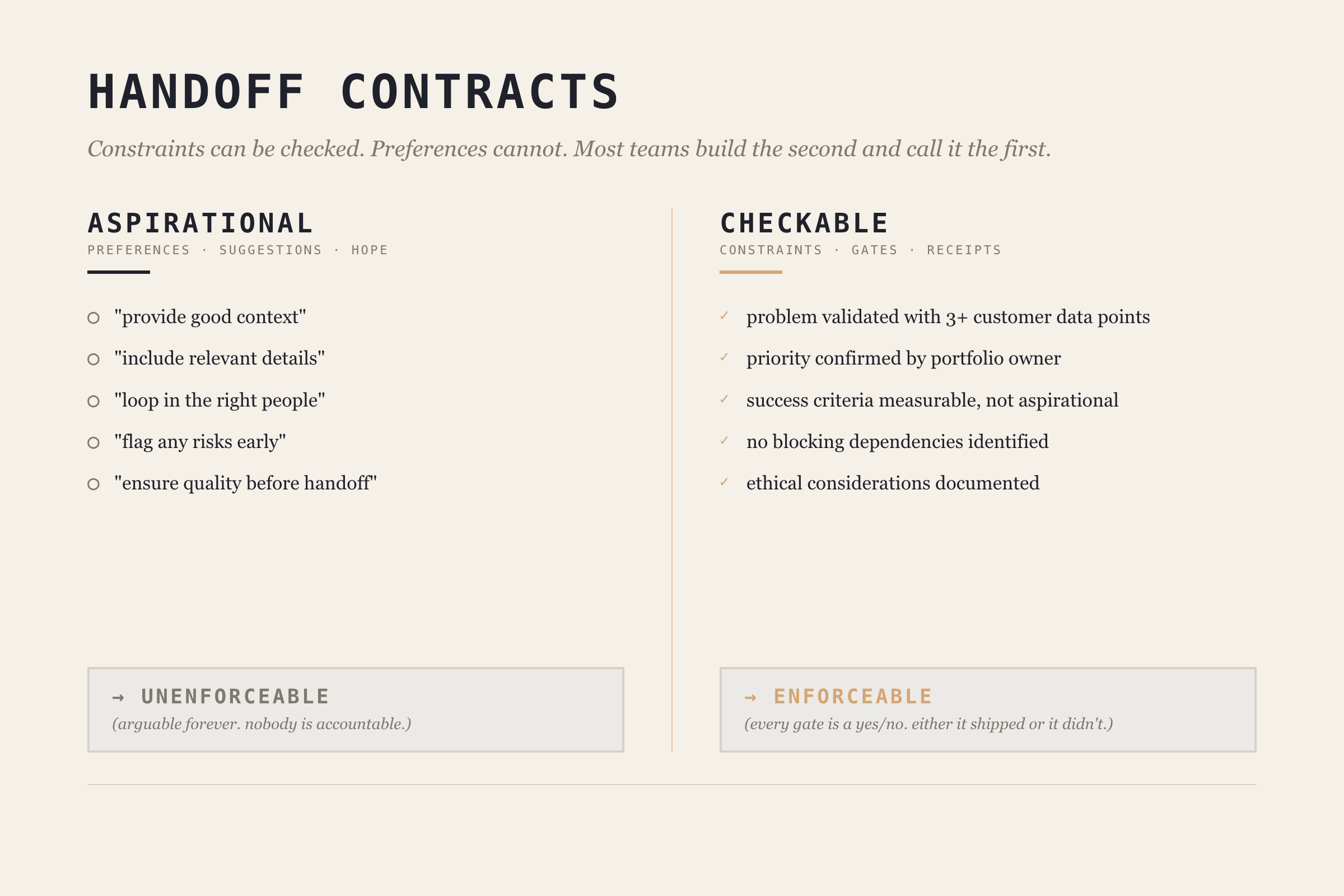
The fix is making handoff contracts checkable, not aspirational. Jones draws a critical distinction: constraints can be checked, preferences cannot. A handoff contract full of preferences ("provide good context," "include relevant details") is just a suggestion. A contract with constraints ("problem brief must include at least 3 customer data points," "no blocking technical constraints identified") is enforceable.
Before: "Write a problem brief for the architect."
After: "Write a problem brief. Must include: validated customer problem with at least 3 data points, business priority confirmed by portfolio owner, success criteria that are measurable, known technical constraints documented. No blocking dependencies identified."
Example (PM → Architect handoff at Discover → Decide boundary):
Handoff: Discover → Decide
From: PM OS
To: Architect OS

Required Context:
  - Problem brief with customer validation (min 3 data points)
  - Business priority signal confirmed by portfolio owner
  - Success criteria (measurable, not aspirational)
  - Known constraints (technical, regulatory, timeline)

Quality Gates:
  - [ ] Problem validated with customer evidence
  - [ ] Priority confirmed (not assumed)
  - [ ] No blocking dependencies identified
  - [ ] Ethical considerations documented

Trigger for Next Stage:
  - Architect acknowledges receipt
  - Decide stage scheduled within 48 hours
The contract works because each gate is a constraint, not a preference. You can check whether customer evidence exists. You can't check whether the brief is "good enough."
When to Delegate vs. Coordinate
Not every task within a Role OS needs the same level of oversight. Jones provides three sorting criteria:
| Factor | Delegate Autonomously | Coordinate Tightly |
|---|---|---|
| Error tolerance | Mistakes are cheap to fix | Correctness is non-negotiable |
| Tool span | Single tool/environment | Multiple tools, integrations |
| Independence | Task is self-contained | Pieces shape each other |
High error tolerance + single tool + independent = delegate and verify after. Low error tolerance + multiple tools + interdependent = coordinate with contracts.
Most teams default to one mode. The sorting framework lets you be deliberate about which tasks get which treatment. Your PM's market scanner can run autonomously with weekly human review. Your architect's infrastructure changes need tight coordination with handoff contracts.
Deep Dive: The Data PM Operating System
Let me show you what a complete Role OS looks like. I'll use the Data PM role. It's what I know best.
PM OS Overview
Purpose: Drive product strategy, prioritize work, synthesize stakeholder needs, and ensure team focuses on valuable problems.
Lifecycle Engagement:
- Discover: Lead
- Decide: Lead
- Build: Support
- Test: Support
- Ship: Consult
- Evaluate: Lead
PM OS Agents
1. Stakeholder Synthesizer
- Input: Meeting transcripts, Slack threads, email threads, survey responses
- Process: Extract themes, identify conflicts, map to stakeholder priority
- Output: Stakeholder landscape document with requirement matrix
- Oversight: PM reviews before sharing; flags conflicting requirements for human resolution
- Blast radius: Read-only. Cannot modify source data or send communications.
2. Market Scanner
- Input: RSS feeds, competitor announcements, industry publications
- Process: Summarize developments, identify relevance to current products
- Output: Weekly market brief with actionable signals
- Oversight: PM curates sources; marks high-importance signals for team attention
- Delegation mode: Autonomous with weekly review (high error tolerance, single tool, independent)
3. Feedback River
- Input: Support tickets, NPS responses, usage analytics, sales call notes
- Process: Aggregate, categorize, identify patterns, surface emerging themes
- Output: Continuous feedback synthesis with pattern alerts
- Oversight: PM validates patterns before they inform prioritization
- Delegation mode: Autonomous collection, coordinated interpretation (patterns need human judgment)
4. Pitch Shaper
- Input: Problem brief, team input, technical constraints
- Process: Structure into Problem → Appetite → Solution framework
- Output: Shaped pitch for betting table
- Oversight: PM drives; Architect reviews technical feasibility section
- Delegation mode: Coordinated (low error tolerance, multi-input, interdependent)
PM OS Context Scaffolds
The PM consumes context from six sources (leadership strategy quarterly, architect constraints per cycle, QA metrics weekly, analytics daily, sales weekly, support daily) and produces five outputs (problem briefs, shaped pitches, priority decisions, customer context summaries, and cycle learnings).
The key design decision: every input and output has a defined format and cadence. No ad-hoc "can you send me that thing?" The context scaffold turns informal information flow into a defined interface. (Full tables in the Data PM OS deep-dive guide, coming after this series.)
PM OS Handoff Contract
Here's what the PM → Architect handoff looks like as a checkable contract:
Contract: Problem Brief Handoff
From: PM OS → Architect OS
Stage: Discover → Decide

Required:
  - customer_problem: "Validated by evidence, not assumption"
  - evidence: "Min 3 data points (quotes, usage data, market signals)"
  - business_rationale: "Why this matters to portfolio"
  - success_criteria: "Measurable, not aspirational"
  - constraints: "Technical, regulatory, timeline"

Quality Gates:
  - [ ] Problem validated with 3+ customer data points
  - [ ] Priority confirmed by portfolio owner
  - [ ] Success criteria include measurable threshold
  - [ ] Ethical considerations documented

Trigger: PM publishes → Architect acknowledges within 24h → Decide begins within 48h
Every gate is checkable. "Validated with 3+ customer data points" is a constraint you can verify. "Good enough context" is a preference you can argue about forever.
The Org Structure Reality
Winter-Tear names the hidden cost: AI Translation Debt. The unpriced work of repairing meaning as it crosses organizational seams. For years, humans absorbed this cost. They carried context. They made judgment calls. They knew who to ask and when to stop.
Agents don't remove that dependence. They remove the time you used to have to hide it.
Role OSes are the mechanism for paying down Translation Debt explicitly. Instead of hoping experienced people will patch the gaps between roles, you design the interfaces so the gaps don't exist.
But none of this works if you pretend org charts don't matter.
Dylan Anderson puts it directly: "Fitting data into an organisation's structure is proving more complicated than most companies can handle." He identifies five structural challenges: ownership ambiguity, role evolution faster than org charts, executives who don't understand data capabilities, leadership vacuums (only 27% of leading organizations have a CDO), and corporate politics.
That last one is the killer. Anderson: "Corporate politics is the single biggest hindrance to an organisation making progress in its data capability."
Role Operating Systems don't solve politics. But they sidestep the problem. They define interfaces between roles, not between reporting lines. The PM OS doesn't care whether the PM reports to Engineering or Product. It cares about what context flows in and what flows out.
Build for interfaces, not for org charts. I've watched three reorgs at NeuroBlu. The reporting lines changed every time. The handoffs between PM and Architect? Same every time.
Building Your Role OS
You don't need to implement everything at once. Start with:
Step 1: Map Your Lifecycle Engagement
Which stages do you lead? Which do you support? This defines where your OS needs depth.
Step 2: Identify Your Key Handoffs
Where do you receive context from others? Where do you hand off to others? These are your critical interfaces. Pick the one where context loss hurts most.
Step 3: Build One Agent
Pick your biggest pain point. Build an agent that addresses it. Define its blast radius and oversight requirements before you define its capabilities. (I learned this order the hard way. My first agent was a feedback aggregator with write access to our product backlog. It helpfully created 47 duplicate tickets in one afternoon.) Run it for 2-3 cycles. Iterate.
Step 4: Define One Handoff Contract
Pick your most problematic handoff. The one where context always gets lost. Make it checkable. Document what constraints must be met, not what preferences you'd like. Hold both sides accountable.
Step 5: Sort Your Tasks
Use the delegation framework. Which tasks in your Role OS can run autonomously? Which need tight coordination? Be deliberate. Default to coordination for anything with low error tolerance or cross-role dependencies.
Step 6: Expand Gradually
Add agents as pain points emerge. Add handoff contracts as you encounter friction. Let the OS grow organically from real problems, not from a comprehensive design document.
Common Failure Modes
Over-Engineering
Building elaborate agents before proving simple ones work. Your first agent should be embarrassingly simple. Add complexity when you've earned it.
Under-Specifying Handoffs
Defining what context is "expected" without defining checkable constraints. If there's no gate, there's no accountability. Handoffs without gates are just suggestions.
Agents Without Guardrails
Jones again: "Either you can name what would make you say 'not yet,' or you're going to keep discovering 'not yet' after it's already shipped." This applies to agent design. If you haven't defined what "done" looks like in checkable terms, your agent will cheerfully produce work that looks complete and isn't.
Solo Optimization
Building a Role OS that makes you faster but doesn't help the team. If your outputs aren't in formats others can consume, you've just built a personal productivity tool. The whole point is composability.
Context Hoarding
Consuming context from others without producing context for them. Role OSes are bilateral contracts. If you take, you give.
What's Next
Part 4 covers The Integration Layer: how individual Role OSes compose into team execution through DPOS's five layers. Role OSes solve the coordination problem between two roles. The Integration Layer solves it across the whole team.
After the core series wraps, I'm publishing individual Role OS guides. The Data PM guide is first (it's half-written already, which tells you something about which role I think about most).
Read the rest of the DPOS series
- Part 0: Is Your Data Team a Dashboard Factory? — the diagnostic that started the series
- Part 1: The Data Product Operating System — the framework introduction
- Part 2: The DPOS Kernel — the principles every Role OS depends on
- Part 4: The Integration Layer (publishing soon)
- Part 5: Implementation (publishing soon)